What's the Best Social Media Tool for a Cleaning Business?
An honest answer for residential and commercial cleaning owners: what a social media tool needs to do for you, and where PostPixel, Canva, Buffer and the free Meta Business Suite each fit best.
For most small cleaning businesses, the best social media tool is the one that makes branded posts for you and publishes them to Facebook, Instagram and Google Business Profile from one place, because that’s the only kind you’ll keep using after a long week of jobs. If you’d rather design every post yourself, Canva is the better pick. If you already have your posts and just need to schedule them, Buffer or Meta’s free Business Suite will do the job.
That’s the short version. The rest of this guide covers what a cleaning company actually needs from a tool, how four popular options compare, and how to pick without wasting a month on the wrong one. Everything we say about other tools comes from their own public pages, checked in November 2026. Prices and features change, so check their pages before you buy.
The short answer
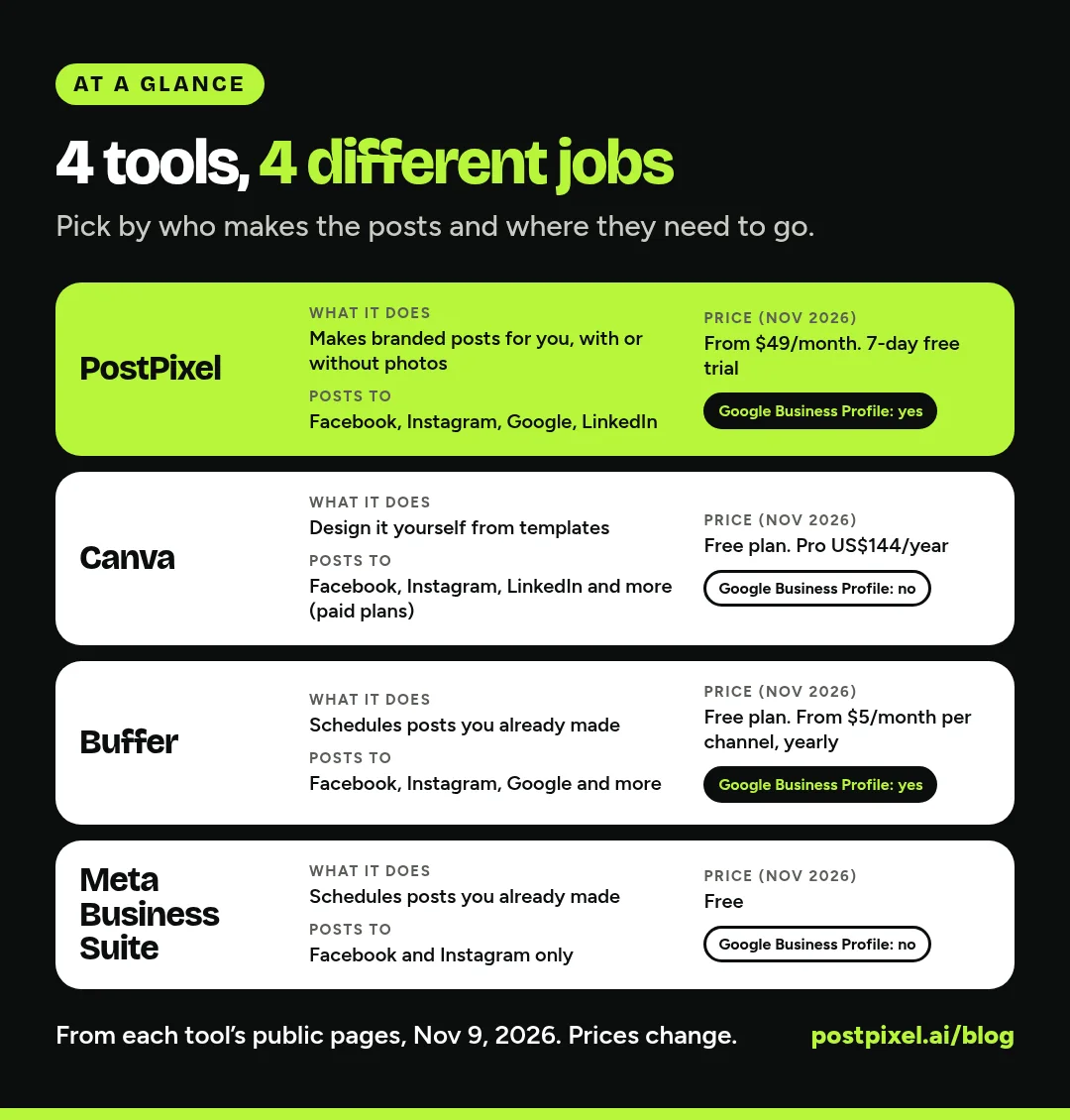
Pick by the job you want the tool to do:
- “Make my posts for me.” PostPixel. It writes and designs branded posts, with or without your photos, and posts to Facebook, Instagram, Google Business Profile and LinkedIn.
- “I like designing, I just need nice templates.” Canva. Huge template library, and paid plans can schedule to Facebook and Instagram.
- “My posts are ready, I need them scheduled.” Buffer. Simple scheduling to lots of channels, including Google Business Profile, with a free plan.
- “I only post on Facebook and Instagram and want to spend nothing.” Meta Business Suite. Free, from Meta, and it schedules to both.
What a cleaning business actually needs from a social media tool
Cleaning is a trust business. Someone is handing you a key to their home or their office. Your social media is often the first place they check whether you’re real, local and still in business. So the tool doesn’t need a hundred features. It needs to help you show up looking professional, week after week, without eating your evenings.
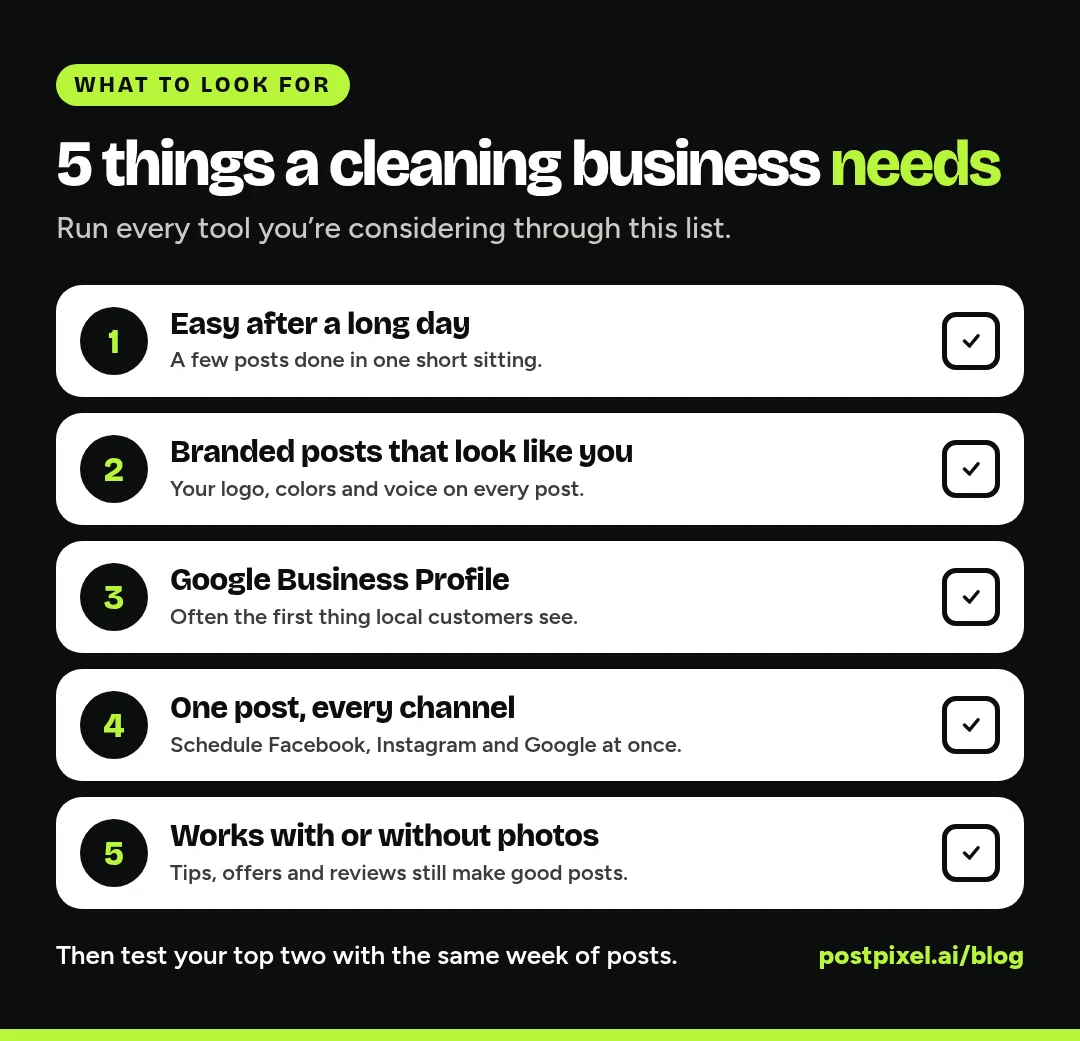
1. Easy enough to use after a long day
Be honest about when you’ll do this. For most owners it’s 9 PM on a Sunday, or in the truck between jobs. If a tool takes an hour to make one post, you’ll stop using it by week three. Look for something where you can get a few posts done in one short sitting.
2. Branded posts that look like your business
Your logo, your colors and a consistent voice make a small company look established. A clean, branded post says “we pay attention to detail,” which is exactly what you’re selling. A tool that keeps your brand on every post saves you from fixing the same things over and over.
3. Google Business Profile, not just Facebook and Instagram
When someone searches “house cleaning near me,” your Google Business Profile is often what they see first. Google lets businesses post updates, offers and events right on the profile, and those posts show on Search and Maps (Google’s help page on Business Profile posts). Plenty of tools skip it, so check the channel list before you buy.
4. Scheduling to every channel at once
Making a post once and sending it to Facebook, Instagram and Google in one go is the difference between “we post” and “we used to post.” Batch a week’s worth on Monday, schedule it, and stop thinking about it.
5. Works with or without great photos
Cleaning results can be hard to photograph. A spotless counter looks a lot like a counter. Some clients don’t want their home on the internet at all, and many commercial clients won’t let you take photos inside. So you need a tool that can make good posts from a tip, a seasonal offer, a review or a simple announcement, not only from photos.
When you do have photos, before and after shots are some of the best posts a cleaner can make. Always ask the client first, and keep addresses, family photos and anything personal out of the frame.
The options, compared fairly
PostPixel: posts made for you, in your brand
PostPixel is an AI social media tool for local businesses and the agencies that serve them. It’s our product, so weigh this section with that in mind.
The point of PostPixel is that posting is easy. You type in your website, and Pixel, PostPixel’s AI, pulls in your business name, logo, colors and services for you to check. Then it creates branded posts with captions in your voice, up to 5 at a time. You approve them, schedule them or post them now.
You don’t need a camera roll full of photos. If you have some, upload them (up to 25 at a time) and Pixel uses them. If you don’t, Pixel can create the imagery for you.
What you get that matters for a cleaning company:
- Six post types: business photo, before and after, promotional (like a spring deep-clean special), educational (cleaning tips), informational (holiday hours, the areas you serve) and Google review posts.
- Before and after pairing: tag two photos Before and After and PostPixel puts them side by side in one branded post.
- Google Business Profile, Facebook, Instagram and LinkedIn from one place. Your Google reviews can become branded posts too.
- The precision editor on every plan: select or brush over one spot and change only that part, like a price or a word in the headline.
- A dashboard that shows views, engagement rate and posts published, plus a coverage calendar card so you can see which days still need a post.
- Teams plan for office staff: if your office manager handles social, they can draft posts and you can review them before they go live.
Pricing: starting from $49/month (Solopreneur). Teams is $79/month. Agency is $99/month with 3 client workspaces, then $37/month each. Every plan starts with a 7-day free trial, with no contracts.
Best for: owners who want posts done for them and don’t want to learn design, and businesses that care about Google Business Profile.
Not the best fit if: you love designing every graphic by hand, or you need tools for channels PostPixel doesn’t post to.
Canva: the design tool most people already know
Canva is a design app with a huge library of templates. Its pricing page, checked November 9, 2026, lists a Free plan, Pro at US$144/year for one person on yearly billing, and Business at US$250/year per person (canva.com/pricing). Pro and Business include a Brand Kit and social scheduling.
Scheduling happens in Canva’s Content Planner. Canva’s help center lists the platforms you can schedule to: Facebook Pages, Instagram business accounts, LinkedIn and a few others. Google Business Profile isn’t on that list, and each design can only be scheduled to one platform at a time (Canva’s Content Planner help page). Scheduling is a paid-plan feature.
Best for: owners or office staff who enjoy design, want full control of every graphic, and also need flyers, door hangers and business cards from the same app.
Watch out for: time. Canva gives you the tools, but you’re still the designer and the copywriter. If you post to three channels, you schedule the same design three times. We’ve compared the two in more depth in PostPixel vs Canva for service businesses.
Buffer: a straightforward scheduler
Buffer is a scheduling tool. You bring the post, and Buffer sends it out on time. Its pricing page, checked November 9, 2026, lists (buffer.com/pricing):
- Free: up to 3 channels, 10 scheduled posts per channel at a time
- Essentials: $5/month per channel on yearly billing ($60 a year)
- Team: $10/month per channel on yearly billing, with unlimited team members and approval workflows
A “channel” is one account, so a Facebook Page, an Instagram account and a Google Business Profile count as three. Buffer publishes automatically to Google Business Profiles, Facebook Pages and Instagram business accounts. Its channel table lists Facebook groups as reminder-only, so you’d still post in local groups yourself. It has an AI assistant for writing and refining captions, and it connects to Canva so you can bring designs in.
Best for: businesses that already have posts (or a designer) and want one calm place to schedule everything, including Google Business Profile.
Watch out for: Buffer doesn’t design branded posts for you. Many owners pair it with Canva, which means two tools and two bills.
Meta Business Suite: free, for Facebook and Instagram
Meta Business Suite is Meta’s own free tool for businesses. Meta’s help center says it’s free on desktop and in the mobile app, and that you can create, schedule and manage Facebook and Instagram content and see it in a calendar view. It also has one inbox for Page messages, Instagram messages and comments (How Meta Business Suite works).
Best for: a brand-new cleaning business that only posts to Facebook and Instagram and wants to spend nothing.
Watch out for: it doesn’t cover Google Business Profile, and it doesn’t make branded graphics. You’d still need something to create the posts.
Side by side
| PostPixel | Canva | Buffer | Meta Business Suite | |
|---|---|---|---|---|
| Makes branded posts for you | Yes | You design from templates | No, you bring the post | No |
| Works without photos | Yes, Pixel can create imagery | Yes, templates and stock | Needs a finished post | Needs a finished post |
| Facebook and Instagram | Yes | Yes (paid plans) | Yes | Yes |
| Google Business Profile | Yes | Not on its scheduling list | Yes | No |
| Starting price (Nov 2026) | From $49/ |
Free plan; Pro US$144/ |
Free plan; $5/ |
Free |
What does it really cost? Count your time too
Price tags only tell half the story. Say you post three times a week. With a design tool plus a scheduler, each post means picking a template, writing a caption, fixing the colors, exporting it and scheduling it to each channel. Even if that’s only 20 minutes, it adds up to hours every month, and that’s time you could spend quoting jobs or cleaning.
That’s why we built PostPixel to do the heavy lifting. More than 500 companies have signed up, and it saves up to 20 hours a month on content. Whatever you pick, write down how long a week of posts actually takes you in the first two weeks. That number will tell you more than any feature list.
A simple way to choose
- Write down where you need to post. If Google Business Profile is on the list, cross off anything that can’t post there.
- Decide who makes the posts. You, an office manager, or the tool. Be realistic about evenings.
- Make one week of posts in your top two tools. Same week, same three ideas: a tip, an offer and a before and after (or a review).
- Keep the one you’d actually open next Sunday.
Need ideas for those test posts? Our list of 50 home service social media post ideas has plenty that work for residential and commercial cleaners, with captions you can edit.
FAQs
What is the best social media tool for a cleaning business?
For most small cleaning businesses, a tool that makes branded posts for you and posts to Facebook, Instagram and Google Business Profile in one step is the best fit, because it’s the one you’ll keep using. PostPixel is built for that. Canva suits owners who like to design, Buffer suits owners who already have posts, and Meta Business Suite is a free option for Facebook and Instagram only.
Is Meta Business Suite enough for a cleaning company?
It can be when you’re starting out. It’s free and schedules to Facebook and Instagram. But it doesn’t post to Google Business Profile, where a lot of local customers find cleaners, and it doesn’t create the posts for you.
Can I post to Google Business Profile from Canva?
Not through Canva’s scheduler, based on Canva’s help center list of supported platforms in November 2026. You can download a design and add it to your profile by hand, or use a tool that posts to Google Business Profile directly, like Buffer or PostPixel.
What should a cleaning business post on social media?
Before and after photos (with the client’s OK), quick cleaning tips, seasonal specials like move-out or spring cleans, your team, the areas you serve and reviews from happy clients. A mix of three posts a week is plenty for most cleaning companies.
Do I need professional photos to post?
No. Phone photos are fine, and you don’t need photos for every post. Tips, offers, service-area updates and review posts work without them, and tools like PostPixel can create the imagery for you.
Make posting the easy part
You started a cleaning business to clean, not to sit in a design app every night. Pick the tool that gets a good-looking week of posts out the door in the least time.
If that sounds like PostPixel, start a 7-day free trial, add your website and see your first branded posts.