Features
Industries
Agencies
Partners
Pricing
PostPixel for agencies

Run social for every client from one login.

Manage every client’s content in one place, with dedicated workspaces and brand kits. Upload their business photos and let Pixel create branded posts.

No contracts · Cancel anytime

Client workspacesExample view
RRoofing clientBrand kit ready
LLandscaping clientBrand kit ready
PPest control clientBrand kit ready
CCleaning clientBrand kit ready
PPlumbing clientBrand kit ready
+ Add client workspace
Up to 5 posts at once, per client
Publish for clients onFacebookInstagramGoogle Business ProfileLinkedIn
Sound familiar?

Client social shouldn't eat your whole week.

Managing posts for a handful of local clients usually means a lot of busywork that clients never see.

Roofing client loginPlumbing client loginCleaning client loginForgot password?

Juggling logins

A different account for every client and every platform. Logging in and out just to post one update.

Any photos from this week's jobs?I'll send some tomorrow…Just checking in again 🙂

Chasing photos

Texting clients for photos, then digging through camera rolls and email threads to find something usable.

Post 1Write · design · resize
Post 2Start over…
Post 3Start over…

One post at a time

Write, design and resize each post by hand, client by client. The week fills up before the posting's done.

With PostPixel One login for every client, business photos in one place, and up to five posts created at once.

How it works for agencies

Five steps per client workspace.

The same simple flow for every client you manage.

  1. 1
    clientbusiness.com→

    Add the client's website

    Create a client workspace and enter the client's website address.

  2. 2
    RRoofing client✓✓ServicesBrand kit✓

    Confirm their details

    Pixel pulls the client's name, logo, colors and services into their brand kit. You check them.

  3. 3

    Upload their photos

    Add as many of the client's business photos as you like.

  4. 4
    ×5

    Create posts

    Pixel creates up to five posts at once in the client's brand. Fix any spot with Select or Brush.

  5. 5
    Client approvesor agency QASchedule

    Approve and schedule

    Invite the client to approve or run your own QA, then schedule or post now.

Brand kit, per client

Every client looks like themselves.

Each client workspace has its own brand kit. Dial in the style, set the rules, and lock the brand assets that must never be redrawn, so Pixel's designs come out on-brand every time.

Business logo
Brand colors
Primary#F2A541Secondary#1E2A44Accent#F6EBDD
Fonts
Heading fontBold GrotesqueBody fontFriendly Sans
What should your posts look like?
All PhotosMostly PhotosPostPixel DefaultMostly DesignedFully Designed
How much text should be on your graphics?
No TextShort & SimplePostPixel DefaultMore InformationInfo-Heavy
Custom Brand Instructions Applied to every post
Advanced Brand Controls
Important to Our Brand

Protected brand assets: things whose design must stay locked.

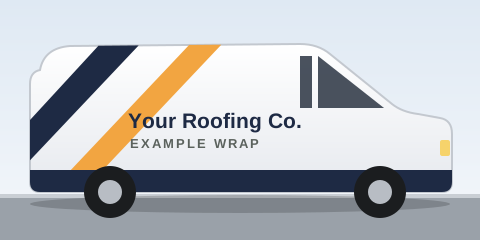
Example wrapped company van🔒 Locked: Pixel won't redraw this
+ Add a protected asset (wrapped van, uniforms, signature product)
Brand Backgrounds

Branded templates, textures and motifs used as foundations.

Live previewPostPixel Default · PostPixel Default
Example
🔒 Locked: Pixel won't redraw this
★Free estimates

Storm season. Is your roof ready?Roof ready?

Free roof checks this month. We spot small problems early.

  • ✓Shingles & flashing
  • ✓Gutters & vents
  • ✓Written report
Book a free check

⌂yourroofingco.com · Serving your area

  • ✓ Logo shown exactly as uploaded
  • ✓ Wrapped van locked, never redrawn
  • ✓ Brand colors and fonts
Try it: client workspaces

Every client brand.
One login.

Click a client to switch workspaces. Each one keeps its own brand kit. Then pick how this client's posts get approved: Client approves or Agency QA, and click through from Drafted to Scheduled.

R

Roofing client

Separate workspace · own brand kit · example view
DraftedSent to clientApprovedScheduled

Brand kit

Logo

Colors

Voice

Approval

Many brands, one loginSwitch between clients in one click. No more juggling logins.
A brand kit per clientEach workspace keeps its own logo, colors and voice.
Approval, your wayYour call: invite the client to approve, or run your own QA. Comment on drafts and review every post before it goes out.
White-label Coming soonYour agency's brand on the experience. Join the waitlist.
Per-client resultsEach client workspace gets its own coverage calendar and analytics (views, engagement and posts published). Show clients what's working, and catch gaps before a client goes quiet. Your team can comment on drafts and review every post before it goes out. Approvals stay your call: invite the client, or run your own QA.
Up to 5 at once, per client

Create up to
5 posts at once.

Other tools make you build one post at a time. Upload as many of a client's business photos as you like, and PostPixel generates up to 5 posts together in that client's brand. Do it in each workspace and every client's week is ready in one go.

Other toolsOne post at a time
PostPixelUp to 5 posts at once
  • 1Open a client's workspace and upload as many business photos as you like
  • 5Pixel generates up to 5 posts together, with that client's logo, colors and voice
  • ✓Send them to the client to approve, or QA them yourself, then schedule
Your photosAs many as you like
Creating up to 5 posts at once…
RoofingStorm season. Roof ready?Your Roofing Co. · Example
LandscapingFall cleanup, booked.Your Landscaping Co. · Example
Pest controlKeep pests out this fall.Your Pest Control Co. · Example
CleaningA clean home, top to bottom.Your Cleaning Co. · Example
PlumbingLeaky sink? We’re on it.Your Plumbing Co. · Example

Example posts for placeholder home-service clients.

Post types

Every kind of post your clients need.

Six post types in every client workspace, including Google review posts. Tap a tab, or swipe the card.

Clients outside the trades work too: nonprofits, senior care, insurance, financial services, mobile detailing and franchises. See example posts →

01 · Business photo posts

Your real work, ready to post.

Upload the business photos on your phone: finished work, your team, your space, your products. Pixel turns each one into a branded post with a caption in your voice.

How it works →
RYour Roofing Co.Example postInstagram
R logo
Just finished

New roof, done before the rain.

Another roof wrapped up this week. Thinking about yours? Free estimates.

02 · Before & after

Show the transformation.

Got a before photo and an after photo? Pixel puts them side by side in one branded post, so people see the difference you make.

Try the before & after slider →
CYour Cleaning Co.Example postFacebook
Before
After
Before & after

Same kitchen. All cleaned up.

Swipe to see the difference a deep clean makes.
03 · Promotional posts

Offers, seasonal specials, events.

Tell Pixel what you're promoting and it designs a post for it: a discount, a seasonal special, an open house or a community event.

Try free for 7 days →
Example
Spring special

Spring tune-up:
$20 off

Your HVAC Co. · Book by the end of the month
Example offer for a placeholder business.
04 · Educational posts

Tips and how-tos that show you know your stuff.

Share helpful advice your customers actually want: quick tips, simple how-tos and warning signs to watch for. Pixel writes and designs them in your voice.

How it works →
Example
Homeowner tip

3 signs your water heater needs service

  1. Rusty or cloudy hot water
  2. Popping or rumbling sounds
  3. Water pooling at the base
Your Plumbing Co.
Example tip post for a placeholder business.
05 · Informational posts

Hours, service area, news and FAQs.

Keep customers in the loop with clear, branded updates: holiday hours, the areas you serve, announcements and answers to the questions you hear every day.

See the FAQ →
Example
Holiday hours

We're open this week.

  • Mon–Wed8 AM – 6 PM
  • ThuClosed
  • Fri8 AM – 4 PM
Your Salon · Example hours
Example informational post for a placeholder business.
06 · Google review posts

Your reviews, turned into posts.

Connect your Google Business Profile and your reviews automatically become branded posts. Happy customers do the talking for you.

Google Business Profile connectedNew reviewBranded post
Example
Google review
★★★★★

“This is where your customer's review appears, word for word.”

EExample customerExample review, not a real customer
PYour Plumbing Co.Example post

Real photos first. No photo handy? Pixel can create an image for you, but your real work always wins.

Agency pricing

$99 a month.
3 clients included.

The Agency plan includes 3 client workspaces. Each extra client workspace is $37 a month. Slide to your number of clients.

Agency plan
$173/mo
How many clients?5 clients
110255075

$99 includes 3 workspaces + 2 extra × $37

Works out to $34.60 per client workspace

The math
ClientsHow it adds upPer month
3 clientsIncluded in the Agency plan$99
5 clients$99 + 2 × $37$173
10 clients$99 + 7 × $37$358
25 clients$99 + 22 × $37$913
50 clients$99 + 47 × $37$1,838

7-day free trial. No contracts, cancel anytime.

Margin calculator · your numbers

What do you charge each client?

Type your own monthly fee per client. We'll compare it with your PostPixel cost for the number of clients on the slider above. A simple tool, not a promise.

Clients5Linked to the slider above
You bill clients—Enter your fee
PostPixel Agency plan$173for 5 client workspaces
What's left each month—Before your time and other costs
PostPixel cost per client$34.60per month

Your fee is whatever you enter. This calculator only does the math: your fee × clients, minus PostPixel's list price. It doesn't include your time, ad spend or anything else.

Book an agency demo →Try free for 7 daysNo contracts · Cancel anytime
White-label Coming soon

Your agency's brand.
Coming soon.

We're building a white-label option so your clients see your agency's brand. It isn't available yet. Join the waitlist and we'll tell you first when it's ready.

Join the white-label waitlist

Agency FAQ

Questions from agencies.

Want to walk through it with your client list? Book an agency demo.

Pixel waving
How does agency pricing work?+

The Agency plan is $99/month and includes 3 client workspaces. Each extra workspace is $37/month. So 5 clients is $173/month and 10 clients is $358/month. It starts with a 7-day free trial, with no contracts, and you can cancel anytime.

What is a client workspace?+

A separate space for each client with its own brand kit (logo, colors and voice), its own business photos and its own posts. Switch between clients from one login.

How many posts can I make at once for a client?+

Up to five at once. Upload as many of a client's business photos as you like, and Pixel generates up to five ready-to-post posts together in that client's brand. You can do this in every workspace.

Do my clients have to approve posts?+

No, it's optional and your call for each client. Invite the client to approve, or run your own QA and publish. Either way you can publish right away or schedule.

Does my client need a login?+

Only if you want them to approve. Invite them to their workspace and they get their own login.

Which platforms can I publish to?+

Facebook, Instagram, Google Business Profile and LinkedIn.

What kinds of posts can it make?+

Six kinds: business photo posts, before & after posts, promotional posts, educational posts, informational posts and Google review posts. Connect a client's Google Business Profile and their reviews can become branded posts.

What if a client doesn't send photos?+

Real photos first. No photo handy? Pixel can create an image for you, but the client's real work always wins.

Is white-label available?+

Not yet. White-label is coming soon. Join the waitlist and we'll let you know when it's ready.

Does PostPixel make videos or Reels?+

Not yet. Today PostPixel makes static image posts. Reels are coming soon.

Can I try it before I commit?+

Yes. Every plan starts with a 7-day free trial. Add a client workspace and see what Pixel makes from their business photos. No contracts, cancel anytime.

Can I control how my posts look?+

Yes. Each client workspace has its own brand kit with the logo, brand colors and fonts. Two sliders set the style, from all photos to fully designed, and how much text goes on your graphics. You can turn icons on or off and add custom brand instructions, like "Always show our logo exactly as uploaded."

Will Pixel change my logo or vehicle wrap?+

Not if you lock them. Add things like your logo, a wrapped van, uniforms or a signature product as protected brand assets, and Pixel shows them as uploaded instead of redrawing them. You can back that up with custom brand instructions.

Book an agency demo

Bring your client list. We'll show you the rest.

A quick walkthrough of client workspaces, up-to-5-at-once posting and approvals (client or agency QA). Or skip ahead and start your 7-day free trial.

No contracts · Cancel anytime$99/mo includes 3 workspaces

Or try free for 7 days →