PostPixel vs Marky: Which Fits a Local Service Business?
Both make branded social posts from your website. Marky covers more networks and includes video; PostPixel has a free plan, makes up to 5 posts at once and lets you edit one spot without redoing the post. Here's an honest side-by-side.
If you’re a local service business that mainly needs good-looking branded posts on Facebook, Instagram and Google Business Profile, and you want to start free and edit posts without redoing them, PostPixel is usually the better fit. Marky is the better fit if you need to post to more networks (X, TikTok, Pinterest or YouTube), want short custom videos included in your plan, or want the lowest monthly price for a single business. Both tools start from your website and make posts in your brand, so the choice comes down to channels, video and how you like to edit.
Marky’s details here come from its public pages, checked on November 16, 2026: mymarky.ai and mymarky.ai/pricing. PostPixel is our product, so weigh our view with that in mind, and check both sites before you decide. Prices and features change.
The short answer
- Pick PostPixel if you’re a home service company, restaurant, nonprofit, insurance agent or other local business that wants branded posts made for you on Facebook, Instagram, Google Business Profile and LinkedIn, wants a free plan to try it on your own business, and likes fixing one spot in a post instead of starting over.
- Pick Marky if you need X, TikTok, Pinterest or YouTube too, want custom videos in your monthly plan, or want the cheapest single-business plan (Marky’s Solo plan is $39/month, or $31.20/month billed annually).
- For agencies: PostPixel’s Agency plan includes 3 client workspaces for $99/month. Marky’s agency plan (Pro) is $229/month with 2 workspaces and an approval workflow. Marky gives you more networks per client.
What Marky is
Marky’s homepage pitch is “Your socials, done for the week.” You type in your website and, in Marky’s words, “Get a week of posts that look like you, sent out on time.” Marky says it plans the month for you (tips, before-and-afters, reviews, offers), uses your logo, colors and photos, and lets you flip through the week and “swap a photo or fix a word in a tap.”
A few things stand out on Marky’s site:
- Templates. Marky offers “designer-made templates” or picks one for you, with images, carousels and graphics in your logo and colors.
- Lots of networks. Its homepage lists Instagram, Facebook, LinkedIn, X, Google Business, TikTok, Pinterest and YouTube, and says you can schedule across all 8 at once.
- Video. Marky’s plans include a set number of “custom videos a month,” and its FAQ says it can take a Canva-like post and animate it, or you can upload your own videos.
- Planning. A drag-and-drop planner for the month.
- Who it’s for. Marky’s FAQ says it works best for professional services (financial advisors, insurance, law and consulting), marketing agencies, and home service pros like HVAC, roofing and pest control.
Marky pricing (as of November 16, 2026)
From mymarky.ai/pricing:
| Plan | Monthly | Billed annually | What’s included |
|---|---|---|---|
| Solo | $39/ |
$31.20/ |
1 workspace, 3 channels, 1 user, 3 custom videos a month |
| Growth | $79/ |
$63.20/ |
1 workspace, 5 channels, unlimited users, 6 custom videos a month, reputation management |
| Pro | $229/ |
$183.20/ |
2 workspaces, 8 channels, unlimited users, 15 custom videos a month, reputation management, approval workflow |
| Enterprise | Contact sales | For large businesses, franchises and agencies |
Extra channels are $7/month each, and extra workspaces are $25/month on Growth and Pro. Marky says every plan starts with a 14-day trial and you pay nothing if you cancel before it ends, and it offers a 7-day refund on any charge.
What PostPixel is
PostPixel makes branded social posts for local businesses. You add your website, PostPixel sets up your brand kit (logo, colors, fonts and voice), and then it creates up to five ready-to-post posts at once, with captions written in your voice. Use your own photos if you have them, or let PostPixel create the visuals. You don’t write prompts.
What it makes: six kinds of posts, including business photo posts, before-and-after posts, promotions, educational tips, informational posts (hours, service area, announcements) and Google review posts, where your reviews become branded graphics.
How you edit: every plan includes the precision editor. Select or brush over the part you want changed and tell PostPixel what to change, like new text, a different color or a swapped photo. Only that spot changes. You can also lock things like your logo or a wrapped van as protected brand assets so they show exactly as uploaded.
Where it posts: Facebook, Instagram, Google Business Profile and LinkedIn. You approve, then publish now or schedule. The dashboard shows views, engagement and a coverage calendar card so you can see which days you’ve got covered.
PostPixel pricing (as of November 16, 2026)
From postpixel.ai/pricing:
| Plan | Price | Highlights |
|---|---|---|
| Free | $0/ |
3 AI-generated branded posts a month (plus 2 bonus posts in your first month), basic editing and downloads, PostPixel watermark, 1 business and 1 social account |
| Solopreneur | $49/ |
Up to 5 posts at once, all six post types, captions in your voice, precise edits, Facebook, Instagram and Google Business Profile publishing |
| Teams | $79/ |
Everything in Solopreneur, plus team members, role-based access, and comment and review management |
| Agency | $99/ |
Includes 3 client workspaces, then $37/ |
Paid plans start at $0.99 for your first week. No contracts, and you can cancel anytime.
Side by side
Setup
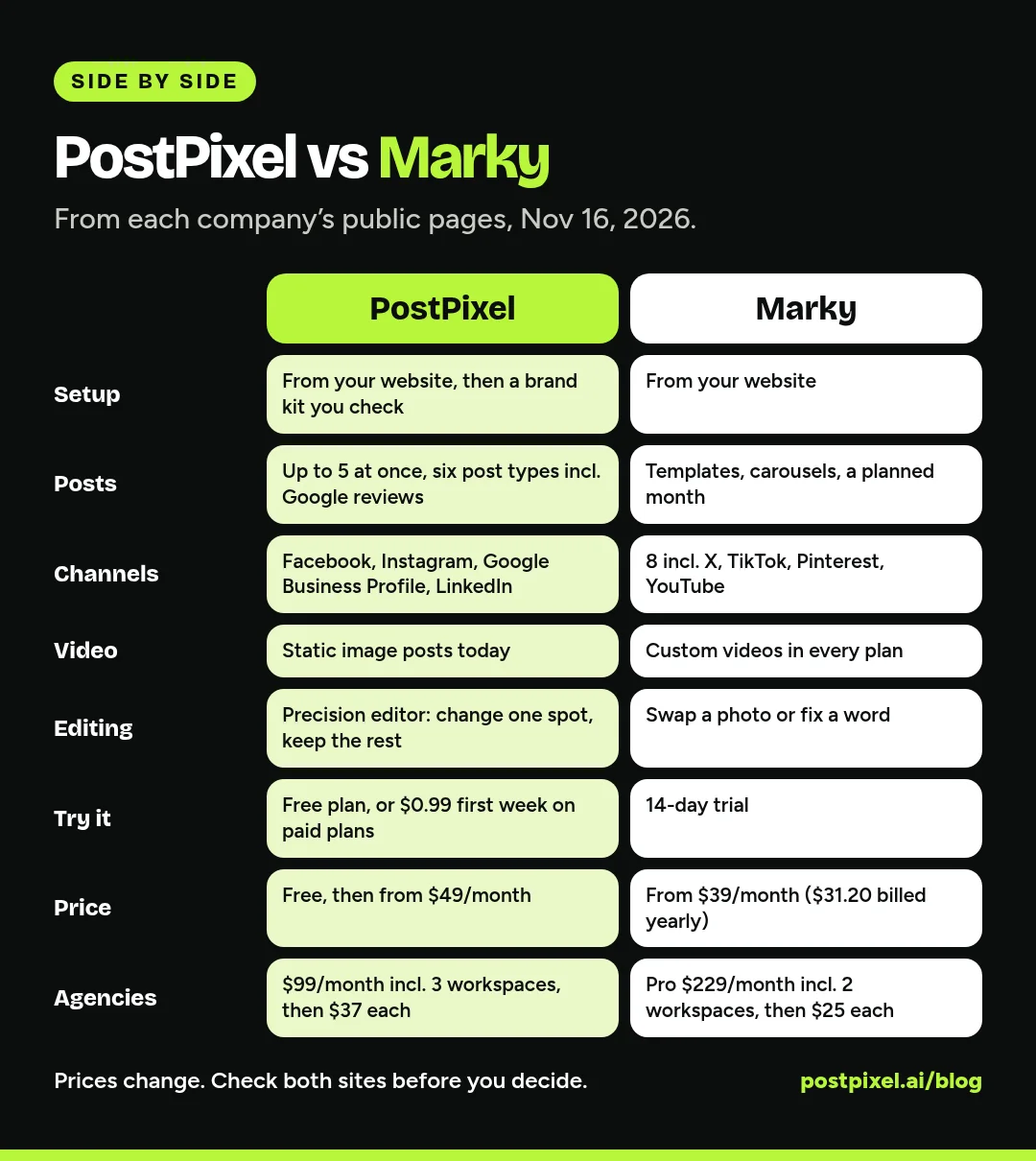
Both start from your website. Marky says it learns your voice, style and customers from it. PostPixel builds your brand kit from it, which you check and adjust (logo, colors, fonts, voice and custom brand instructions).
The posts themselves
Both make branded posts in your logo and colors, and both cover the post types local businesses need: tips, offers, before-and-afters and reviews. Marky leans on templates and carousels. PostPixel makes up to five posts at once and has two style sliders, one from “all photos” to “fully designed” and one for how much text goes on the graphic.
Editing
Marky lets you “swap a photo or fix a word in a tap.” PostPixel’s precision editor lets you change one spot (text, color, a photo, removing something) and keeps the rest of the post exactly the same. If you’re picky about your brand, try both on the same post and see which you prefer.
Channels
This is Marky’s clearest advantage. If your customers are on TikTok, Pinterest, X or YouTube, Marky covers them and PostPixel doesn’t. For most home service companies, restaurants and local offices, Facebook, Instagram and Google Business Profile do the heavy lifting, and both tools cover those. PostPixel also publishes to LinkedIn.
Watch the channel counts on Marky’s plans: Solo includes 3 channels and each extra is $7/month. A business on Facebook, Instagram, Google Business and LinkedIn would need one extra channel on Solo.
Video
Marky includes custom videos each month (3 on Solo, 6 on Growth, 15 on Pro). PostPixel makes static image posts today. If video is a must for you right now, that points to Marky.
Trying it out
PostPixel has a free plan you can keep using, plus a $0.99 first week on paid plans. Marky has a 14-day trial on every plan. Either way, try it on your real business before you commit.
For agencies
Both tools sell to agencies, and the math is worth doing.
- PostPixel Agency: $99/month with 3 client workspaces, then $37/month for each extra. PostPixel’s pricing page works it out: 5 clients is $173/month and 10 clients is $358/month. Each client gets its own brand kit, up to five posts at once, and you choose per client whether they approve posts or you run your own QA.
- Marky Pro: $229/month with 2 workspaces and 8 channels, then $25/month per extra workspace and $7/month per extra channel. Pro adds an approval workflow and a client portal. By our math from Marky’s listed prices, 5 client workspaces would be $304/month before any extra channels. Check how channels are counted for your clients before you compare.
If your clients need TikTok, Pinterest or YouTube, or you want video in the package, Marky may be worth the higher price. If your clients are local businesses that live on Facebook, Instagram and Google, PostPixel costs less per client. Our guide to managing social media for multiple clients covers the workflow side.
Where Marky is the better choice
To be plain about it, Marky is the better pick if:
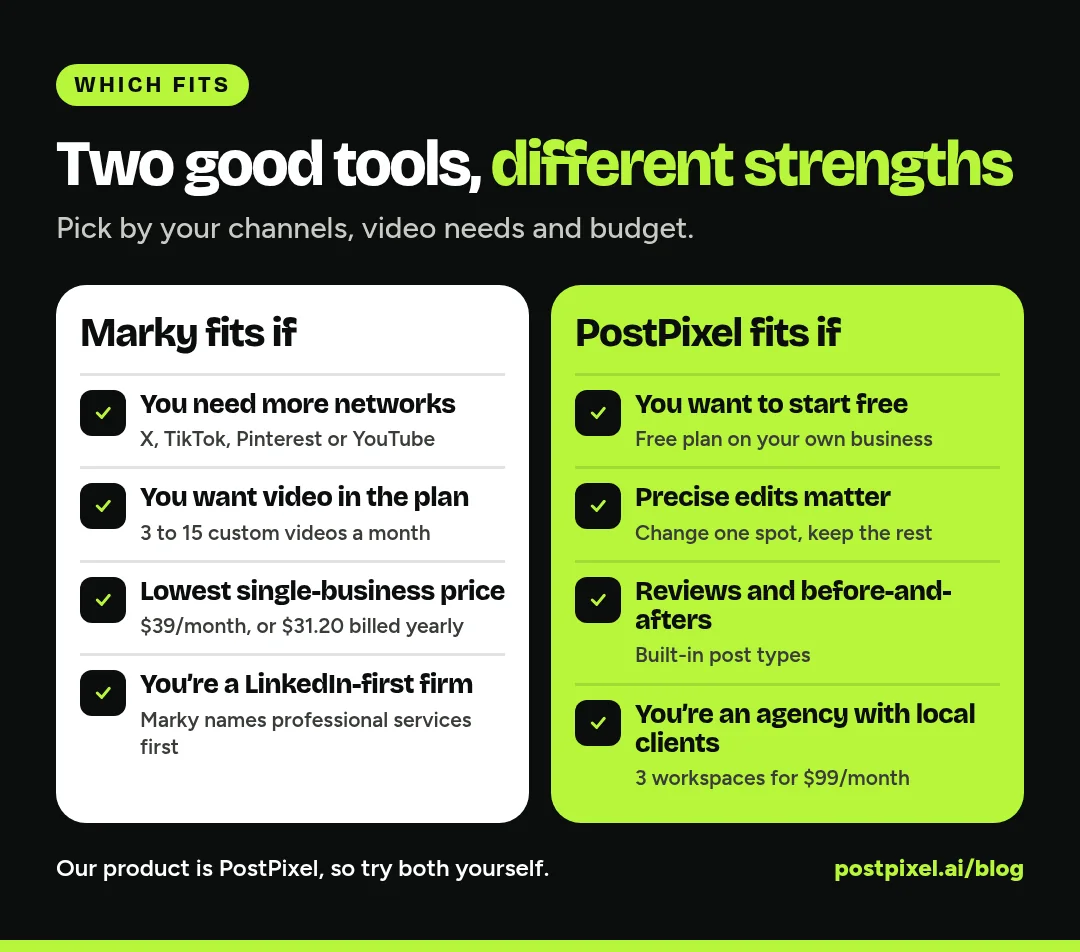
- You need more than four networks. TikTok, Pinterest, X or YouTube matter to your customers.
- You want video in the plan. Marky includes custom videos every month.
- Price is the deciding factor for one business. $39/month, or $31.20/month billed annually, is lower than PostPixel’s $49/month Solopreneur plan.
- You’re a professional services firm that lives on LinkedIn and wants a tool that says it’s built for you first.
Where PostPixel is the better choice
PostPixel is the better pick if:
- You want to start free. The free plan lets you see branded posts for your own business before you pay.
- You care about precise edits. Change one spot without touching the rest, on every plan.
- Google reviews and before-and-afters are your best content. Both are built-in post types.
- You’re an agency with local clients. Three workspaces for $99/month, then $37/month each.
- You want posting to feel easy. Up to five ready-to-post posts at once, in your brand, with or without photos.
500+ companies have signed up for PostPixel, and it saves up to 20 hours a month.
How to decide in a week
- List the networks your customers actually use. If it’s only Facebook, Instagram and Google, both tools work.
- Try both on your real business, with the same website and the same week of ideas.
- Make the same three posts in each: a tip, an offer and a review.
- Time how long it takes to get each one ready to publish, edits included.
- Do the price math for your plan, channels and (for agencies) client count.
If you’re also weighing schedulers like Buffer or Later, or an all-in-one tool like Holo, see our PostPixel vs Holo comparison.
FAQ
Is Marky good for local service businesses?
It can be. Marky’s FAQ names home service pros like HVAC, roofing and pest control among the businesses it works best for, and it posts to Google Business. It’s strongest when you need many networks or video.
How much does Marky cost?
As of November 16, 2026, Marky’s pricing page lists Solo at $39/month, Growth at $79/month and Pro at $229/month, or 20% less billed annually ($31.20, $63.20 and $183.20 a month). Extra channels are $7/month and extra workspaces $25/month on Growth and Pro. Enterprise is priced by sales.
How much does PostPixel cost?
PostPixel has a free plan. Paid plans start from $49/month (Solopreneur), Teams is $79/month and Agency is $99/month with 3 workspaces, then $37/month for each extra. Paid plans start at $0.99 for your first week.
Does PostPixel post to TikTok or Pinterest?
No. PostPixel publishes to Facebook, Instagram, Google Business Profile and LinkedIn. If you need TikTok, Pinterest, X or YouTube, Marky covers them.
Which is better for agencies, PostPixel or Marky?
It depends on your clients. PostPixel is cheaper per client for local businesses on Facebook, Instagram, Google and LinkedIn. Marky covers more networks and includes video, at a higher starting price.
Try it on your own business
The fastest way to decide is to see your own posts. Start free with PostPixel, or try Solopreneur, Teams or Agency for $0.99 for your first week.