What Should an Insurance Agent Post on Social Media?
Local insurance agents win on trust, not on clever ads. Here are the four kinds of posts that work, a simple weekly plan, where LinkedIn and Google fit, and the compliance checks to run before anything goes live.
An insurance agent should post things that make a neighbor trust them before they ever need a quote: local community posts, timely “check your coverage” reminders, plain-English explainers and the people behind the agency. Three posts a week from those four buckets is plenty. And because insurance is a regulated business, every post should pass your carrier’s or agency’s rules before it goes out.
What you shouldn’t post is a feed full of rate promises, scary headlines and “get a quote today” graphics. People rarely buy insurance from an ad they scrolled past. They buy it from someone they already recognize when the renewal notice arrives or the new car is in the driveway.
This guide covers the four kinds of posts that work for local agents, a simple weekly plan, where Facebook, Instagram, LinkedIn and Google Business Profile each fit, and the compliance checks to run first.
Not legal or compliance advice. Insurance advertising rules vary by state, by line of business and by carrier. If you’re appointed with carriers or work under an agency or franchise, ask about their social media and advertising approval rules before you post. If you’re also registered to sell securities, your broker-dealer’s rules apply too.
The short answer
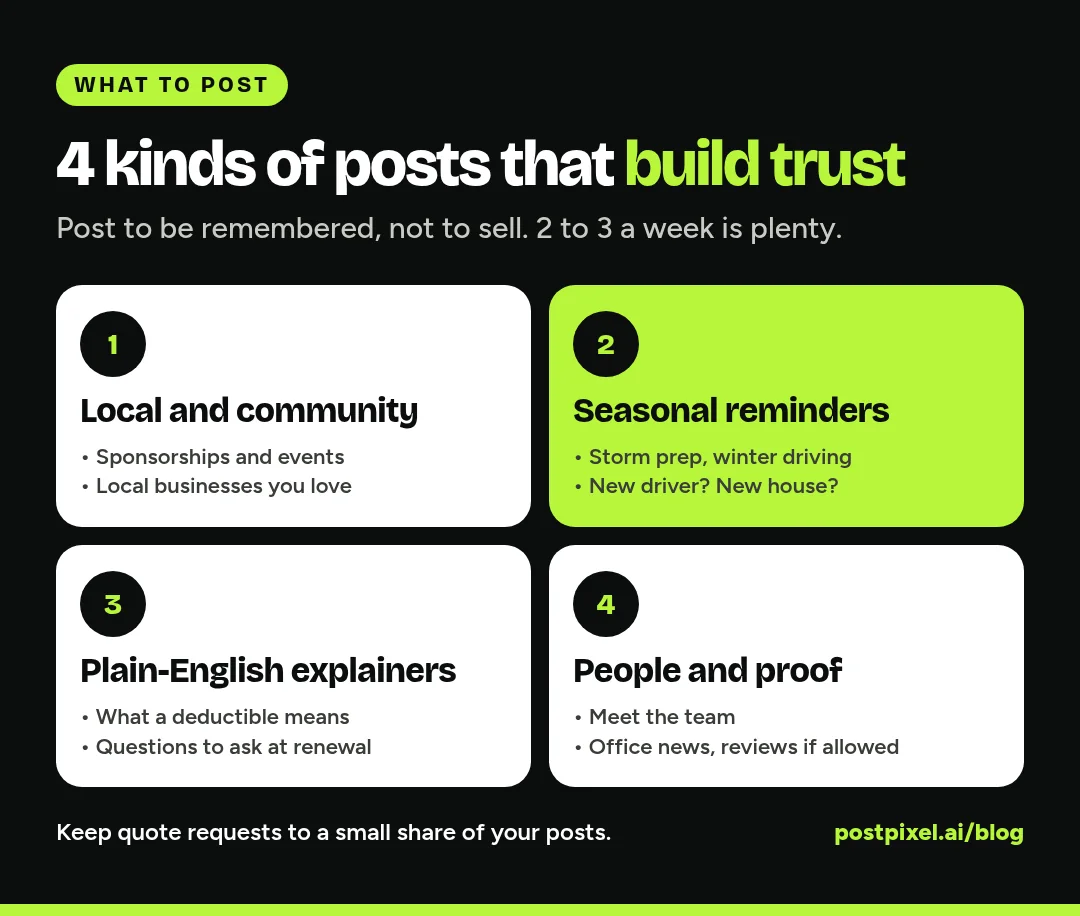
Post to be remembered, not to sell. A good mix for a local agent:
- Local and community (about 1 in 3 posts): sponsorships, events, local businesses, your team out in town
- Seasonal reminders (about 1 in 3): timely, practical prompts like storm prep, winter driving or “new driver in the house?”
- Plain-English explainers (about 1 in 4): what a deductible is, what renters insurance usually covers, questions to ask at renewal
- People and proof (the rest): your team, office news and, where your rules allow, reviews
Aim for 2 to 3 posts a week, every week. A steady, friendly feed does more for a local agency than a burst of daily posts followed by silence.
The four kinds of posts that work
1. Local and community posts
Your biggest advantage over the national brands is that you live where your customers live. Show it.
Ideas:
- The Little League team or school event you sponsor
- A local business you insure or love (with their permission), tagged so their followers see it
- Your team volunteering, at the farmers market or at a 5K
- Community news that matters to your clients, like a new road closure or a town clean-up day
- A “welcome to the neighborhood” post for new businesses in town
These posts aren’t about insurance at all, and that’s the point. They remind people you’re the local agent, not a call center.
2. Seasonal “check your coverage” reminders
Life events and seasons are when people actually think about insurance. Get there first with a calm, useful reminder.
Ideas by season:
- Spring: storm and hail season prep, a reminder to photograph your belongings for a home inventory
- Summer: boats, RVs and motorcycles back on the road, teen drivers out of school, vacation home checks
- Fall: back to school and college students moving out, preparing a home for winter
- Winter: winter driving, frozen pipes, holiday travel, end-of-year business reviews
- Any time: new car, new house, new baby, a wedding, a home business, retirement
The tone matters. “A quick reminder before storm season: here are 3 things to check on your policy” builds trust. A post that leans on fear does the opposite. Keep it practical and finish with a soft offer: “Happy to look over your policy with you.”
3. Plain-English explainers
Most people don’t understand their policies, and they know it. An agent who explains things simply becomes the person they call.
Ideas:
- “What does a deductible actually mean?”
- “Three questions to ask at your renewal”
- “Liability vs. full coverage, in one minute”
- “Why your rate can change even if you didn’t file a claim”
- “What to do in the first hour after a fender bender”
Keep explainers general. Avoid saying any policy “covers” a specific situation, because coverage depends on the policy, the carrier and the state. Phrases like “many policies,” “usually” and “check your policy or ask us” keep you accurate. Never quote a price or promise a saving in an explainer.
4. People and proof
People want to know who they’ll be talking to when something goes wrong.
Ideas:
- Meet the team: one person, one photo, one fun fact
- Office news: a new hire, a license earned, a new location, holiday hours
- Your “why”: a short post about why you became an agent
- Reviews and thank-yous, if your rules allow it (see the compliance section)
These are some of the most-liked posts on any local business Page, and they’re easy to make with a phone photo.
A simple weekly plan
Here’s a plan an agent or a busy office manager can keep up in about 30 minutes a week:
- Monday: a seasonal reminder or explainer. Start the week useful.
- Wednesday: a local or community post. Sponsorships, events, local businesses.
- Friday: people and proof. A team member, an office update or a thank-you.
Make all three in one sitting, send them through your approval process, and schedule them. Then spend five minutes a day replying to comments and messages, and move any policy questions to a private channel. Don’t discuss someone’s policy details in public comments.
Where each channel fits
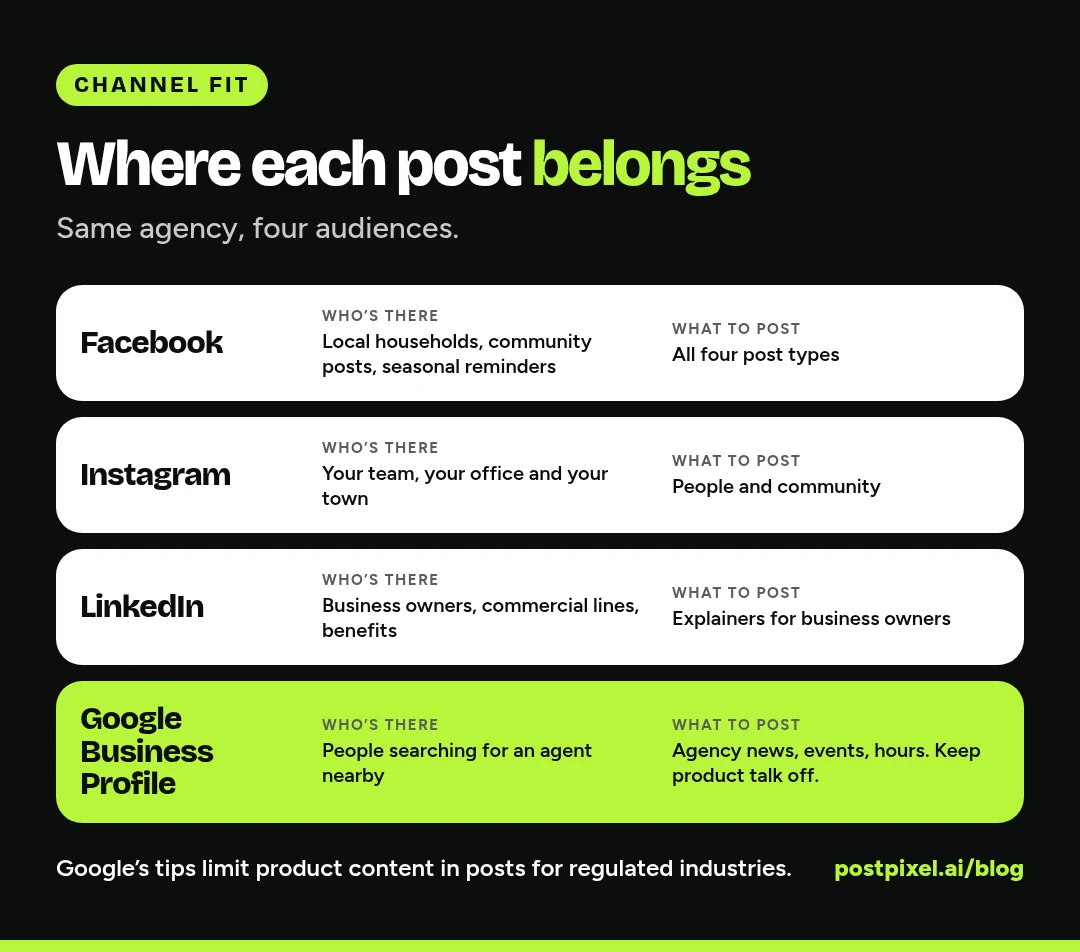
Still the home base for most local agents. It’s where families, homeowners and local groups are. Community posts, seasonal reminders and team posts all work here.
Good for the human side: your team, your office, community events. Explainers work too if you keep the text on the graphic short.
If you write commercial lines, business owner policies or employee benefits, LinkedIn is where your buyers are. Share plain-English explainers for business owners (for example, “questions to ask before you hire your first employee”), local business spotlights and your own short take on what you’re seeing in the market, without promising outcomes.
Google Business Profile
When someone searches “insurance agent near me,” your Google Business Profile is often what they see first. Google lets businesses post updates, offers and events that show on Search and Maps (Google’s help page on Business Profile posts).
One important catch: Google’s own tips on that page say businesses in regulated industries, and it lists financial services among them, can use posts but shouldn’t include content about the products. So on Google, stick to agency news, hours, events, team and community posts, and keep the insurance product talk for your other channels.
The compliance check before you post
Insurance is regulated at the state level, and every state has an insurance department (the NAIC’s directory of state insurance departments lists them all). On top of that, carriers, agencies and franchises often have their own social media policies. You don’t need to be a lawyer to post safely, but you do need a habit of checking.
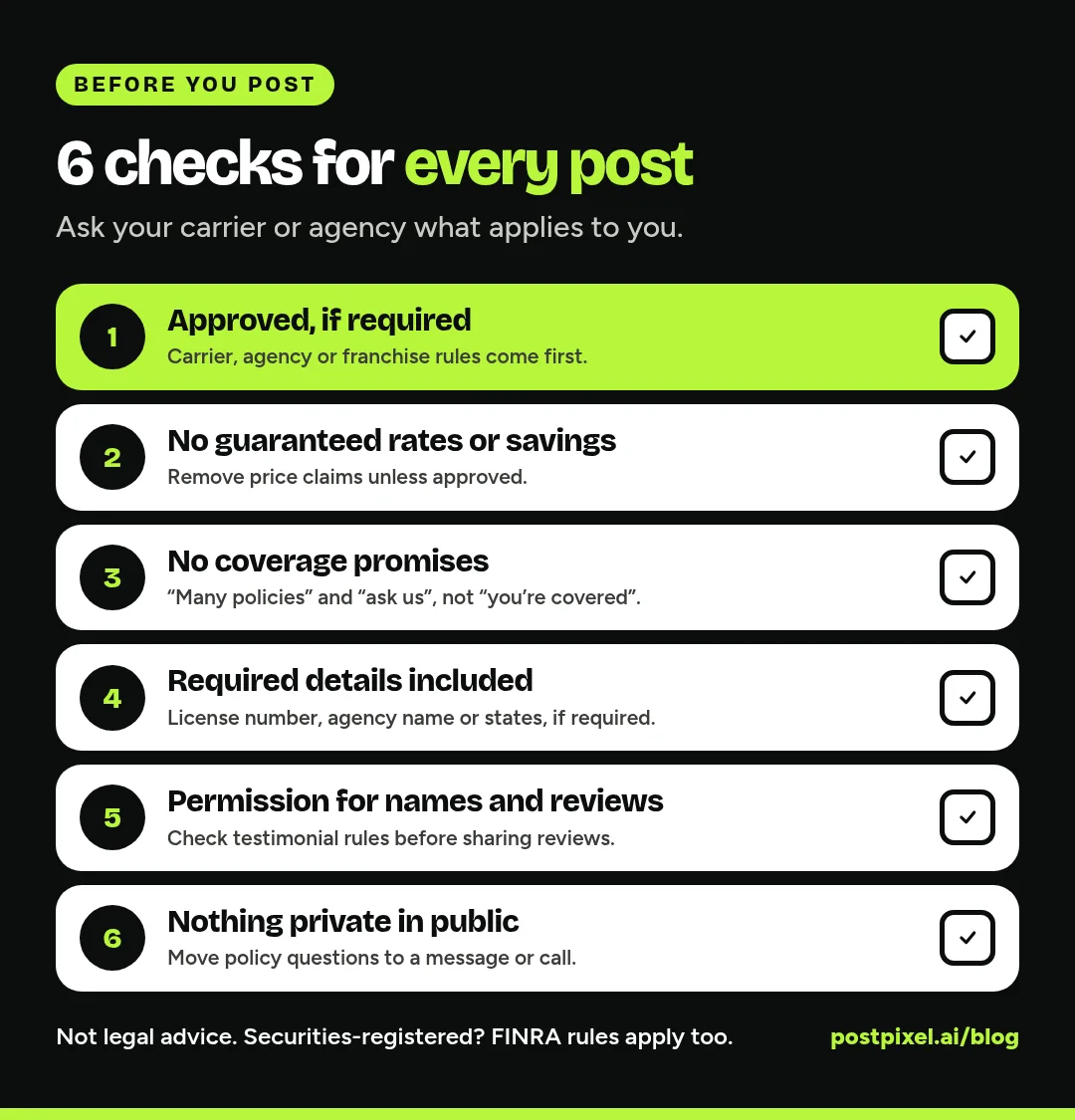
Before anything goes live, ask:
- Does this need approval? If your carrier, agency or franchise requires posts or ads to be approved, get it first. Ask whether they have pre-approved content you can use.
- Does it promise a rate or a saving? Remove any guarantee or price claim unless it’s been approved.
- Does it promise coverage? Say “many policies” or “ask us about your policy,” not “you’re covered.”
- Is the required information there? Your state or carrier may require things like your license number, agency name or the states you’re licensed in on certain communications. Ask what applies to you.
- Do you have permission? Get a client’s OK before posting their name, photo, business or review. Some carriers and states have rules about testimonials, so check before you share reviews.
- Is anything private? Never post or discuss a client’s policy, claim or personal details, and move policy questions to a private message or call.
If you also hold a securities license: FINRA says its communications rules apply to social media, that business-related content must be retained for at least three years, and that most static content (like a post) must be approved by a registered principal before use (FINRA’s social media page). If you sell variable products or offer investment advice, your broker-dealer’s compliance team has the final word.
Keep a simple record of what you posted and when. If you ever need to show what you said, a scheduling tool’s history or a shared folder of approved posts makes it easy.
The tools: making posts without becoming a designer
Most agents don’t have time to design graphics between client calls. Here’s an honest look at your options. Everything about other tools comes from their public pages.
- Your carrier’s or franchise’s content library. If you’re a captive or franchise agent, start here. Pre-approved content is the safest and fastest option, and many agents don’t use it.
- Meta Business Suite (free). Schedule Facebook and Instagram posts and see them on a calendar (How Meta Business Suite works). It doesn’t design posts for you, and it doesn’t cover LinkedIn or Google Business Profile.
- A design tool like Canva. Great if you or someone in the office enjoys design, but you’re still writing and designing every post yourself.
- PostPixel. This is our product, so weigh this with that in mind. You add your agency’s website, and Pixel, PostPixel’s AI, pulls in your logo, colors and services for you to check, then makes branded posts with captions in your voice, up to 5 at a time. You don’t need photos; Pixel can create the imagery, or use your team and community photos when you have them. You can edit any post, then approve and schedule it to Facebook, Instagram, LinkedIn and Google Business Profile. On Teams and Agency plans, teammates can comment on and review posts before they go live, which fits an office where someone checks posts before they’re published.
PostPixel has a free plan (3 branded posts a month, plus 2 bonus posts in your first month, with a PostPixel watermark, for 1 business and 1 social account). Paid plans start from $49/month, Teams is $79/month, and Agency is $99/month with 3 workspaces, then $37/month for each additional one. Paid plans start at $0.99 for your first week. More than 500 companies have signed up, and it saves up to 20 hours a month on content.
Whatever tool you use, it doesn’t replace your compliance check. AI-written captions can sound confident about coverage, so read every one with the checklist above before you approve it.
Mistakes insurance agents make on social media
- Posting only quote requests. “Get a quote today!” five times a week trains people to scroll past.
- Using fear. Scary headlines and disaster photos can feel exploitative, and may break your carrier’s rules.
- Promising coverage or savings. Even in a casual post, it can create a compliance problem.
- Answering policy questions in public. Move them to a private message or call.
- Disappearing. A Page that last posted in March makes people wonder if the agency is still open.
- Skipping LinkedIn when you write commercial lines. That’s where business owners are.
FAQs
What should an insurance agent post on social media?
Four kinds of posts: local and community posts, seasonal “check your coverage” reminders, plain-English explainers, and posts about your team and agency. Keep quote requests to a small share of your posts, and run every post past your carrier’s or agency’s rules.
How often should an insurance agent post?
Two to three times a week is a realistic target for most local agents. Consistency matters more than volume, so pick a number you can keep up during renewal season.
Do insurance agents need approval to post on social media?
It depends on your state, your carriers and your agency. Many carriers, agencies and franchises have social media or advertising policies, and some require approval before posting. If you’re also registered to sell securities, FINRA rules and your broker-dealer’s approval process apply.
Can insurance agents share client reviews on social media?
Sometimes. Get the client’s permission first, and check your carrier’s, agency’s and state’s rules on testimonials before you share reviews. Never include policy or claim details.
Should insurance agents use Google Business Profile posts?
Yes, for agency news, events, hours, team and community updates. Google’s help page says businesses in regulated industries, including financial services, can use posts but shouldn’t include content about the products, so keep product talk off Google posts.
What should insurance agents post on LinkedIn?
Plain-English explainers for business owners, local business spotlights, team news and short takes on what you’re seeing in your market. It’s especially useful if you write commercial lines or employee benefits.
Make posting the easy part
You’re already the person your clients call when something goes wrong. Social media just lets more neighbors know you’re there. Pick the four post types, set a 30-minute weekly slot and make the compliance check a habit.
If you’d like the posts made for you, start free with PostPixel, add your agency’s website and see your first branded posts. Running a team? Try the Teams plan for 7 days.