Can ChatGPT Write a Change Order for Me?
ChatGPT can turn a quick note from the job site into a clear change order and a plain-English explanation for the homeowner. It shouldn't set the price, the new schedule or your legal terms. Five copy-paste prompts that keep those yours.
Yes, ChatGPT (or Claude, or Gemini) can draft a change order for you: it’s good at turning “found rot under the tub, need to replace subfloor” into a clear description of the change, why it’s needed and what the customer is agreeing to. What it shouldn’t do is set the price, the new completion date or the legal terms, because it doesn’t know your costs, your schedule or your state’s rules. You fill those in, and the customer signs before the extra work starts.
That last part matters more than the wording. A change order exists so you and the customer agree on what changed, what it costs and how it affects the schedule, in writing, before anyone picks up a tool. AI just makes it fast enough that you’ll actually do it on a busy job.
This guide gives you five copy-paste prompts, from a job-site note to a signed change order and a running log. Every prompt tells the AI to leave prices, dates, code items and legal terms as [BRACKETS] for you. The examples lean on remodeling, plumbing, electrical, HVAC and roofing, but they work for any trade that does jobs under a contract.
Before you use any change order: this article is not legal advice. Some states set specific rules for change orders on home improvement work. Have a lawyer licensed in your state review your change order template before you use it, and paste their wording in word for word.
Why change orders are worth the five minutes
Most job-site disputes start the same way: the work changed, someone said “go ahead” out loud, and the final bill surprised the customer. A written change order prevents that by putting three things on paper:
- What changed: the extra (or reduced) work, in words the customer understands
- What it costs: the amount added to or taken off the contract
- What it does to the schedule: the new completion date or how many days it adds
In some states those three things aren’t just good practice. California’s home improvement law, for example, says a change order isn’t enforceable against the buyer unless it states the scope of the work, the amount added or subtracted, and the effect on progress payments or the completion date (California Business and Professions Code 7159.6). Other states have their own rules, which is why the lawyer review isn’t optional.
What AI should and shouldn’t do on a change order
The AI can draft:
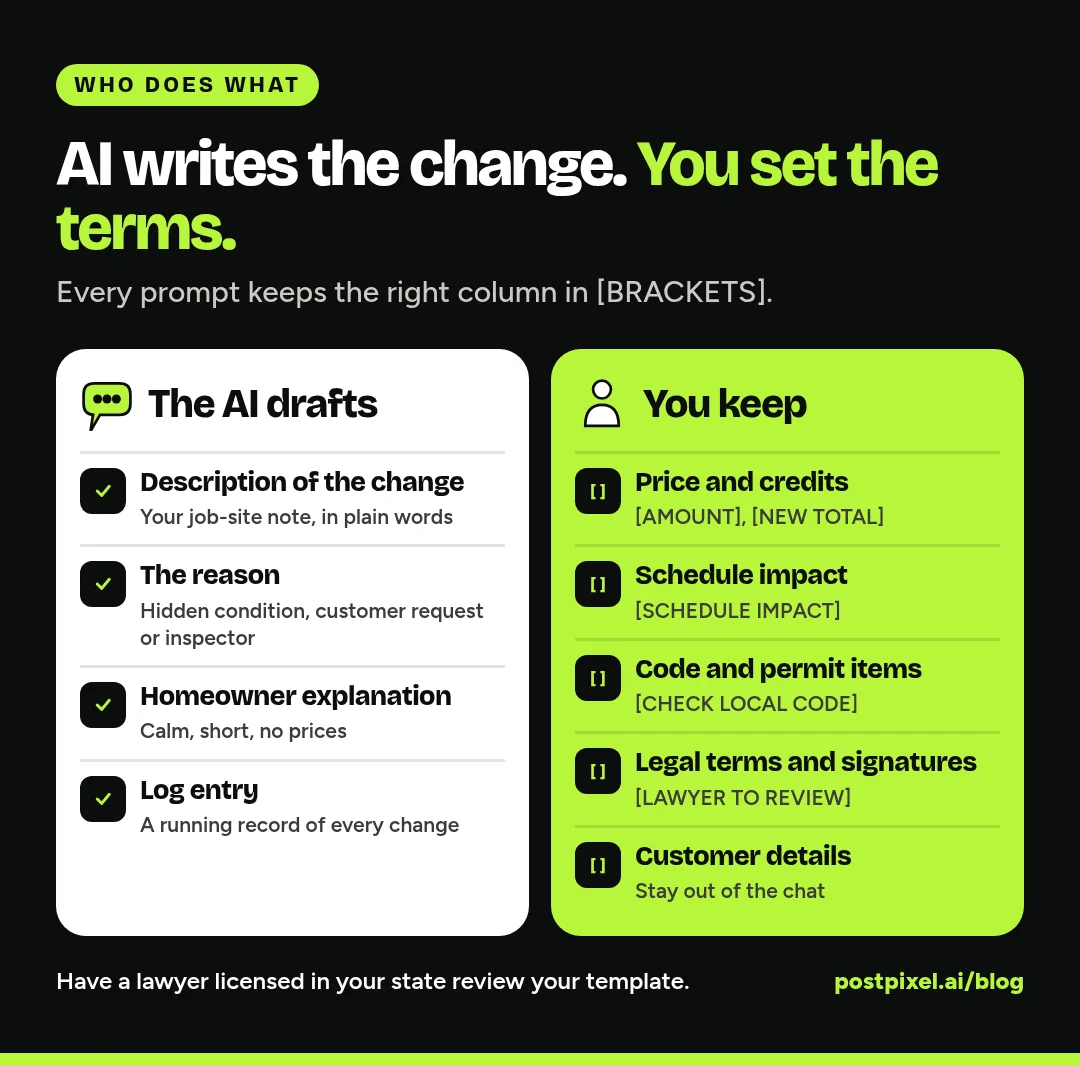
- A clear description of the change and the reason for it
- A short explanation for the homeowner, without jargon
- The layout of the change order, so nothing gets left off
- A running change order log entry for your records
You keep:
- The price. Labor, materials, markup, credits. If a number appears that you didn’t type, delete it.
- The schedule impact. Only you know what the change does to your crew’s calendar.
- Code and permit items. Whether the change needs a new permit or inspection. The AI marks them [CHECK LOCAL CODE].
- Legal terms and signatures. Payment terms, how the change affects the original contract, signature and date lines. The AI marks them [LAWYER TO REVIEW].
- Customer details. Names, addresses and payment details stay out of the chat. Use [CUSTOMER NAME] and [JOB ADDRESS], and fill them in inside your own software.
The five prompts
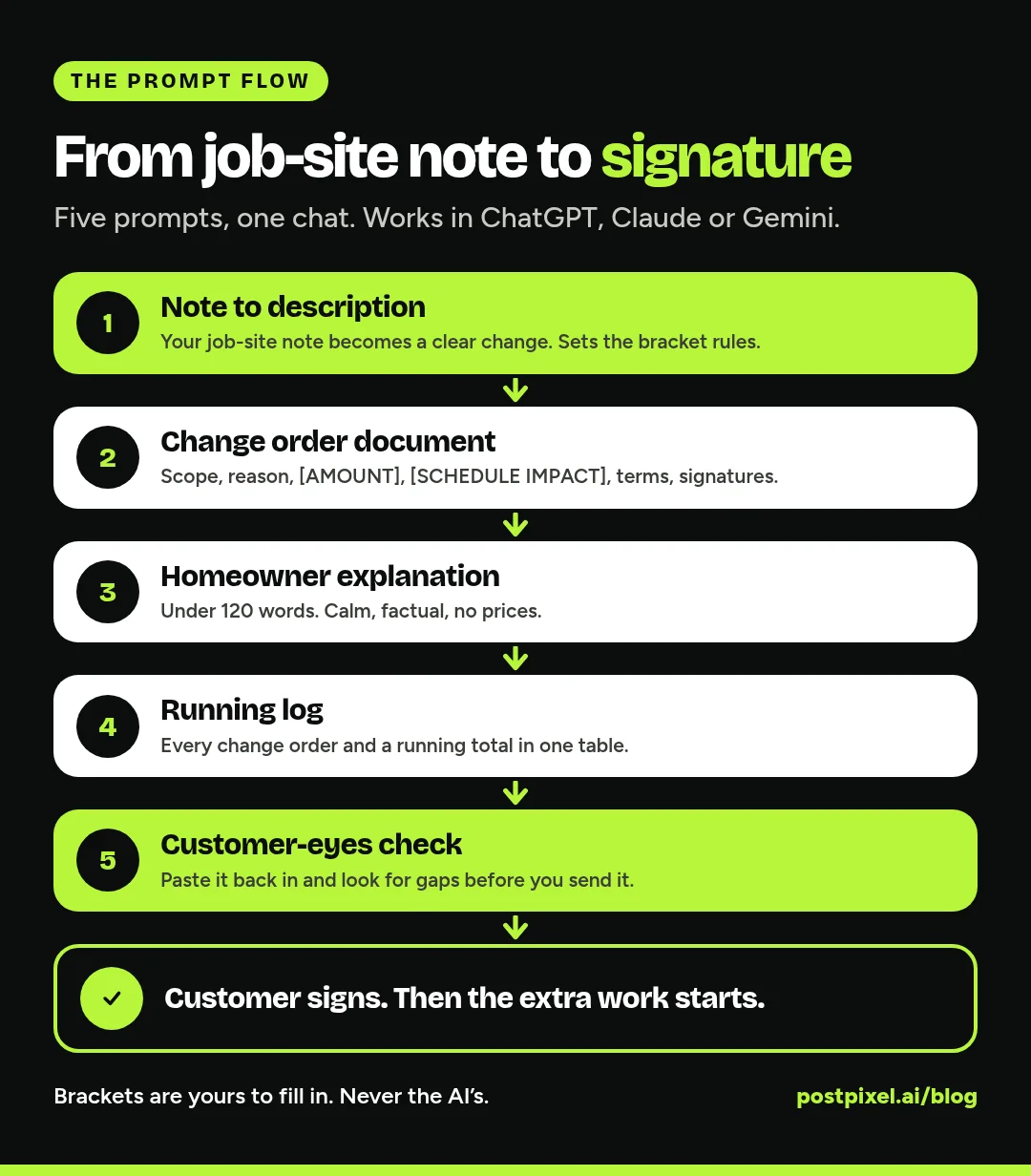
Run these in one chat so the AI keeps the context. Copy a prompt, fill in the [BRACKETED] parts that are yours, and paste it in. If the AI gets something wrong, tell it plainly (“we’re not replacing the joists, just the subfloor”).
Prompt 1: Set the rules and describe the change
This prompt sets the guardrails for the whole chat and turns your note into a clear description.
I own a [TRADE, e.g. remodeling / plumbing / electrical / HVAC / roofing] company in [STATE].
We're partway through a job under a signed contract: [ORIGINAL JOB, e.g. "hall bathroom remodel"].
Something has changed and I need a change order.

Rules for this whole conversation:
- Never write a price, cost, credit, quantity, markup, hourly rate or payment amount. Leave every number as a [BRACKETED PLACEHOLDER].
- Never write a completion date or number of days. Use [SCHEDULE IMPACT].
- Never state code, permit or inspection requirements as fact. Mark them [CHECK LOCAL CODE].
- Never write payment, contract or signature terms as final. Mark them [LAWYER TO REVIEW].
- Use [CUSTOMER NAME] and [JOB ADDRESS]. Don't ask me for real customer details.
- Plain, friendly language a homeowner understands.

Here's what changed, in my own words:
[PASTE YOUR NOTE, e.g. "pulled the tub, subfloor rotted about 3x4 ft near drain, has to be replaced before new tub goes in. customer saw it."]

Who asked for the change: [CUSTOMER REQUEST / HIDDEN CONDITION FOUND / CODE OR INSPECTOR REQUIREMENT / OTHER]

Write:
1. A one-sentence summary of the change.
2. A short description of the extra (or removed) work, step by step.
3. Why it's needed, in two plain sentences.
If anything in my note is unclear, ask me before guessing.
The “who asked for the change” line matters. A customer-requested upgrade, a hidden condition and an inspector’s requirement read differently, and the AI will word each one properly.
Prompt 2: Build the change order document
Now turn that into a change order document with these sections:
- Header: [COMPANY NAME], change order number [CO #], date [DATE], original contract date [CONTRACT DATE], [CUSTOMER NAME], [JOB ADDRESS]
- Description of the change (from above)
- Reason for the change
- Cost: amount added to or subtracted from the contract: [AMOUNT]. Original contract amount [ORIGINAL AMOUNT], previous change orders [PREVIOUS CO TOTAL], new contract total [NEW TOTAL]
- Effect on payments: [PAYMENT CHANGES, LAWYER TO REVIEW]
- Effect on schedule: [SCHEDULE IMPACT]
- Permits or inspections: [CHECK LOCAL CODE]
- Terms: [LAWYER-APPROVED CHANGE ORDER TERMS, PASTE AS-IS]
- A line saying the extra work won't start until this is signed
- Signature and date lines for the customer and for [YOUR NAME]
Keep it to one page. Don't add any terms I didn't give you.
Fill in the brackets yourself, in your own estimating or field service software if it has a change order template. Keep the “won’t start until signed” line. It protects you and the customer.
Prompt 3: The homeowner explanation
The change order is the paperwork. This is the conversation.
Write a short message (under 120 words) to send with this change order. It should:
- Explain what we found or what changed, in plain words
- Say why it matters (safety, the finished result, or what the customer asked for)
- Tell them what happens next: review, sign, then we continue
- Offer to walk them through it on site or by phone: [HOW TO REACH US]
Calm and factual. No pressure, no scare words, no exclamation marks, and no prices in the message.
If you found something unexpected, a photo helps more than any wording. Attach one from the job, with nothing personal in the frame.
Prompt 4: The running change order log
On a bigger job, several change orders add up. A simple log keeps you and the customer on the same page.
Create a simple change order log table for this job with columns:
CO #, date, short description, requested by, amount [AMOUNT], schedule impact [DAYS], status (sent / signed / declined), signed date.
Add this change order as the first row, with every number left as a bracket.
Then write one sentence I can put at the top of each new change order: "This is change order [CO #]. Total of all change orders to date: [RUNNING TOTAL]."
Paste the log into your spreadsheet or job notes and keep it updated. Sharing a running total with the customer avoids the end-of-job surprise.
Prompt 5: Check it like the customer would
Once you’ve filled in the numbers and your lawyer’s terms, paste the finished change order back in, still with [CUSTOMER NAME] and [JOB ADDRESS] as placeholders, and run:
Act as a careful homeowner reading this change order before signing. List:
- Anything unclear or easy to misread
- Anything that seems to conflict with the original job
- Whether it's clear what the extra work is, what it costs and how it affects the schedule
- Questions you'd ask before signing
Don't change any prices, dates or legal terms. Just point out problems so I can fix them.
Tweaks by trade
Add a line of trade context to Prompt 1 and the drafts get sharper.
Remodeling
Hidden conditions are your most common change: rot, old wiring, uneven floors. Ask the AI to keep “what we found” separate from “what we’ll do about it,” and to put allowance overages (tile, fixtures) as their own line with an [ALLOWANCE DIFFERENCE] bracket.
Plumbing
Tell it what you found once the wall or floor was open: corroded supply lines, a failing shutoff, a drain slope problem. Keep patching and finish work as a separate line or an exclusion, and mark gas and venting items [CHECK LOCAL CODE].
Electrical
Panel capacity, old wiring and added circuits are typical. Anything about code upgrades the inspector requires stays [CHECK LOCAL CODE], and ask the AI to note whether the change needs a revised permit, as a bracket you confirm.
HVAC
Duct changes, line set replacements, electrical upgrades for new equipment and thermostat wiring. Ask it to list each as its own line so each carries its own [PRICE]. Keep refrigerant work, permits and any efficiency or rebate statements marked [CHECK LOCAL CODE] or [VERIFY].
Roofing
Decking replacement is the classic change. Ask the AI to word it per unit ([PRICE PER SHEET], [NUMBER OF SHEETS]), and to say the count will be confirmed in writing as the tear-off goes.
Mistakes to avoid
- Starting the work on a verbal OK. Get the signature first. If it’s urgent, ask your lawyer how to handle emergency changes in your contract.
- Copying a number the AI wrote. If you didn’t type it, delete it and put the bracket back.
- Leaving out the schedule. “Adds [SCHEDULE IMPACT]” is part of the deal, not an afterthought.
- Letting the AI rewrite your legal terms. Paste your lawyer’s wording in as-is.
- Pasting real customer details. Templates only. Names, addresses and payment details stay in your own software.
- Forgetting credits. When work is removed, write a change order for that too, with the [CREDIT AMOUNT] filled in by you.
Putting it to work
- Save the prompts once. Keep them in a note on your phone so you can run Prompt 1 from the truck.
- Use your software’s template. Many estimating and field service tools have change order or job-note features. Put your lawyer-approved terms there once.
- Link it to the estimate. If you used our ChatGPT prompts for estimates, your scope, inclusions and exclusions make the change easy to describe: anything outside them is a change.
- Same method for longer documents. Our service and maintenance agreement prompts use the same bracket rules.
FAQ
Can ChatGPT write a change order?
Yes, for the wording and structure: the description of the change, the reason, a homeowner explanation and a log entry. You set the price, the schedule impact and the legal terms yourself, and have a lawyer licensed in your state review your template.
What should a change order include?
Usually: your company and the customer placeholders, the original contract reference, a change order number and date, a description of the change and why it’s needed, the amount added or subtracted, the new contract total, the effect on payments and the schedule, any permit or inspection notes, your lawyer-approved terms, and signature lines. Some states require specific items, so check with your lawyer.
Does a change order have to be signed before the work starts?
It’s the safest practice, and in some states the rules on written change orders affect whether you can enforce it. Get it signed before the extra work begins, and ask your lawyer how your contract should handle urgent changes.
Is it safe to put customer information into ChatGPT?
Keep it out. Use [CUSTOMER NAME] and [JOB ADDRESS] in the chat, and fill in real details in your own software. Never paste payment details into any AI chat.
Do these prompts work in Claude or Gemini?
Yes. They’re plain language and don’t depend on any one tool. Run them in one conversation so the AI keeps the context from your note.
One more thing
When the job’s done, changes and all, PostPixel makes it easy to share the finished work in a branded post, no design work needed. Start free.