ChatGPT Prompts for Service and Maintenance Agreements
Seven copy-paste prompts that turn how you already run maintenance visits into a clean, tiered service agreement, with every price and legal clause left in brackets.
Most home service owners know a maintenance plan is good for business. Customers who sign one tend to call you first when something breaks, and the visits fill the slow weeks. The hard part is the paperwork. Somebody has to write down what a tune-up includes, what it doesn’t, what happens at renewal and how a customer cancels.
That’s a job ChatGPT, Claude or Gemini can help with, as long as you use them the right way. An AI chat tool is good at organizing what you already know into clean sections and plain language. It is not good at knowing your prices, your state’s rules or what your lawyer would want in a contract. If you let it guess at those, it will, and it will sound sure of itself.
This guide gives you seven copy-paste prompts that build a service or maintenance agreement step by step. Every prompt tells the AI to leave prices, code requirements and legal terms as [BRACKETS] for you to fill in. The examples lean on HVAC, plumbing and lawn care, but the same prompts work for pest control, pool service, cleaning, electrical and most other trades that do repeat visits.
Before you use any agreement: this article is not legal advice. Have a lawyer licensed in your state review your agreement before you hand it to a customer. Rules on automatic renewal, cancellation and consumer contracts vary by state.
Three ground rules before you open the chat
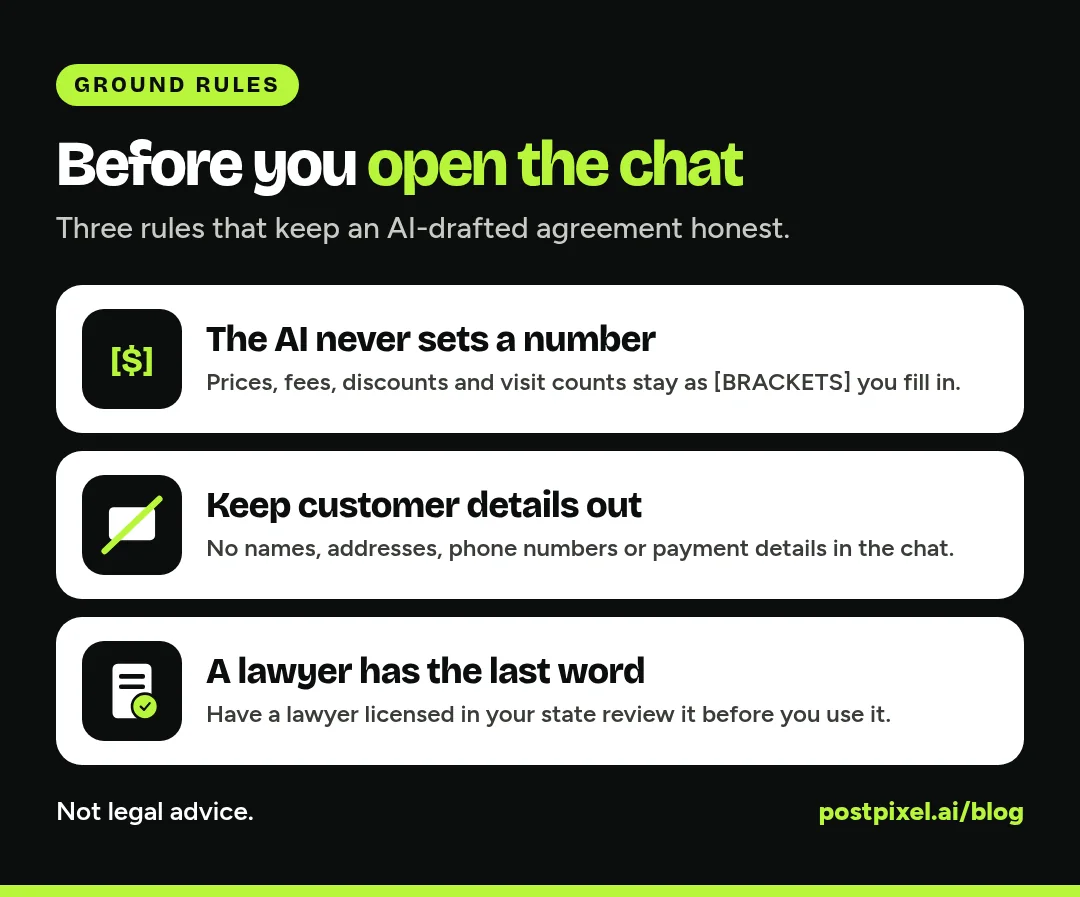
1. The AI never sets a number. Prices, visit counts you haven’t decided, discount percentages, late fees, deposit amounts: all of these stay in brackets like [PRICE PER YEAR] until you fill them in yourself. The prompts below say this out loud, because if you don’t, the AI will make up something that looks reasonable.
2. Keep customer details out. You’re building a template, not a contract for Mrs. Smith on Elm Street. Don’t paste customer names, addresses, phone numbers or payment details into the chat. Use placeholders like [CUSTOMER NAME] and fill them in inside your own software.
3. A lawyer has the last word. The AI can give you a clean, organized first draft. It can’t tell you whether your cancellation clause holds up in your state, whether you need specific renewal notices, or how your warranty language interacts with the manufacturer’s. That review is worth paying for once, and then you reuse the template for years.
What goes in a maintenance agreement
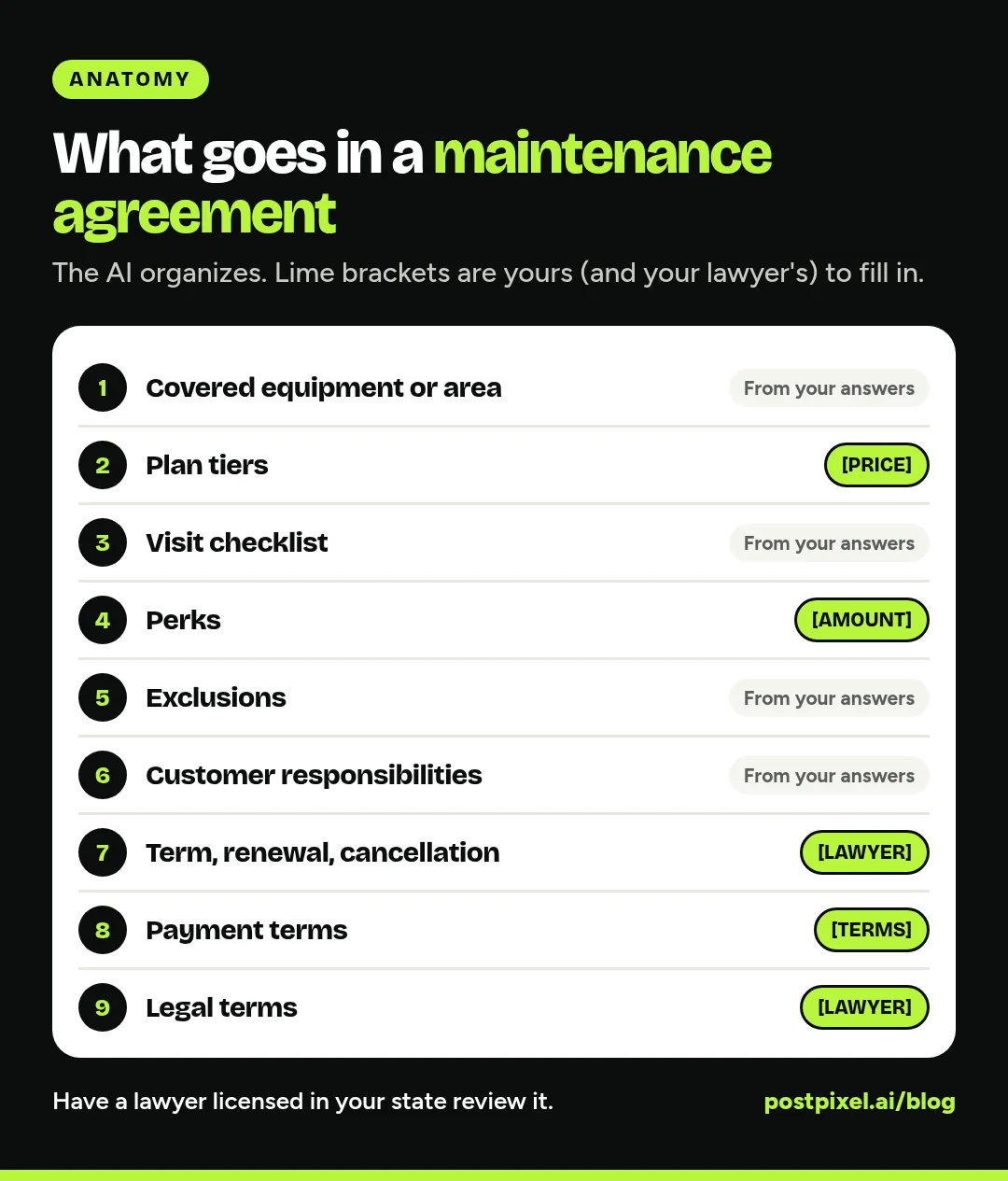
Before you start prompting, it helps to know the pieces you’re building toward. Most residential service agreements cover the same ground:
- Who and what: your business details, the customer, the service address and the equipment or area covered.
- Plan tiers: what each level includes and what it costs.
- Visit checklist: what the tech actually does on each visit.
- Perks: priority scheduling, discounts on repairs, waived trip fees, if you offer them.
- Exclusions: what the plan doesn’t cover.
- Customer responsibilities: access, pets, filters, reporting problems.
- Term, renewal and cancellation: how long it runs, how it renews and how either side ends it.
- Payment terms: when and how the customer pays.
- Legal terms: liability, warranties, disputes and anything else your lawyer adds.
The prompts below take you through those sections in order. Run them in the same chat so the AI keeps the context from one step to the next.
The seven prompts
Copy each prompt, replace the [BRACKETED] parts with your details, and paste it in. Read every answer before you move on. If something is wrong, say so in plain words (“we don’t service boilers, take that out”) and the AI will fix it.
Prompt 1: Set the rules and let it interview you
This first prompt is the most important one. It sets the guardrails for the whole chat and gets the AI asking you questions instead of guessing.
I own a [TRADE, e.g. HVAC / plumbing / lawn care] company in [STATE].
I want to create a residential maintenance agreement template.

Rules for this whole conversation:
- Never invent prices, fees, discounts, percentages or visit counts. Leave them as [BRACKETED PLACEHOLDERS] for me to fill in.
- Never state code, permit or licensing requirements as fact. Mark them as [CHECK LOCAL CODE].
- Never write legal clauses as final. Mark them as [LAWYER TO REVIEW].
- Use plain, friendly language a homeowner understands.
- Don't ask me for any customer's personal details.

Before writing anything, ask me 10 to 12 questions about how I run maintenance visits today, what equipment or areas I cover, and what I want the plan to do for my business. Ask them one group at a time.
Answer the questions the way you’d explain your plan to a new office manager. Voice-to-text works fine here. The more real detail you give, the less the draft sounds like a generic template.
Prompt 2: Build the plan tiers
Most trades do well with two or three levels. This prompt sets them up without putting numbers on them.
Using my answers, draft 3 plan tiers: [TIER 1 NAME], [TIER 2 NAME] and [TIER 3 NAME]. For each tier, list:
- Number of visits per year: [VISITS] unless I told you a number
- What's included on each visit
- Perks (priority scheduling, repair discount, waived trip fee), with every amount left as a [BRACKET]
- Who it's best for, in one sentence

Show it as a simple table, then as short paragraphs I could put on a sales sheet. Keep the price as [PRICE PER YEAR] and [PRICE PER MONTH] for every tier.
A tip: if you only offer one plan today, ask for a single tier and a short “add-ons” list instead. Don’t let the AI talk you into a pricing structure you haven’t thought through.
Prompt 3: Write the visit checklist
This is where your agreement earns trust. A homeowner who can see exactly what the tech checks is much easier to renew next year. It also gives your techs a standard to work to.
Write the visit checklist for each tier as a numbered list a technician could follow on site. Group it by [SYSTEM OR AREA, e.g. outdoor unit / indoor unit / thermostat]. Use only the tasks I described. If you think a common task is missing, list it separately under "Suggested additions" so I can decide.
Add a closeout step: photos of the work, notes for the customer, and anything that needs a quote.
That “Suggested additions” line matters. It keeps the AI from quietly adding tasks your crew doesn’t do, which is how a customer ends up expecting something you never promised.
Prompt 4: Spell out what’s not covered
Most arguments over maintenance plans start here. Be specific.
Draft a "What this plan does not cover" section. Include parts and repairs beyond the visit, pre-existing problems, damage from outside causes, equipment I don't service, and anything else I mentioned. Write each exclusion in one plain sentence. Mark anything that touches warranties or liability as [LAWYER TO REVIEW]. Don't promise that any repair or part is covered unless I said so.
Prompt 5: Customer responsibilities, renewal and cancellation
This prompt covers the parts that need the most care. Renewal and cancellation rules are exactly where state law tends to step in, so everything stays bracketed.
Draft these sections with placeholders, not final terms:
1. Customer responsibilities (access to equipment, pets secured, telling us about problems, [OTHER]).
2. Term and renewal: the plan runs for [TERM LENGTH]. Renewal is [AUTOMATIC / MANUAL]. Notice before renewal: [NOTICE PERIOD].
3. Cancellation: how the customer cancels, how we cancel, and any refund for unused visits: [REFUND TERMS].
4. Payment: [PAYMENT SCHEDULE], [PAYMENT METHODS], [LATE FEE, IF ANY].
Mark every section [LAWYER TO REVIEW] and add a note listing the questions I should ask my lawyer about each one.
The list of questions for your lawyer is the useful part. It makes a short review call much more productive.
Prompt 6: Write a one-page summary for the customer
The full agreement is for the file. The summary is what actually sells the plan at the kitchen table or on the invoice.
Write a one-page, plain-English summary of the plan for homeowners. Lead with what they get, then how visits are scheduled, then how renewal and cancellation work. Keep every price and term as a [BRACKET]. No hype, no exclamation marks.
End with one line telling them the full agreement has the complete terms.
Prompt 7: Stress-test your draft
Once you’ve filled in your own prices and your lawyer’s edits, run one last pass. Paste the finished template (still with [CUSTOMER NAME] and the other customer fields as placeholders) and ask:
Act as a homeowner who reads contracts carefully. Read this maintenance agreement and list:
- Anything unclear or easy to misread
- Places where what's included and what's excluded seem to conflict
- Questions a customer would likely ask before signing
Don't rewrite the legal sections. Just point out issues so I can take them to my lawyer.
Tweaks by trade
The prompts work as written, but a line or two of trade context makes the output a lot better. Add these to Prompt 1.
HVAC
Tell it whether visits are seasonal (one cooling, one heating), which equipment types you service, and whether filters are included or billed. Ask it to list refrigerant work and any repairs as quote-only items rather than included tasks, and to keep any refrigerant or safety requirements marked [CHECK LOCAL CODE].
Plumbing
Plumbing plans often cover a water heater flush, a whole-home inspection and a priority line. Tell it which fixtures and appliances you inspect, and ask it to keep drain cleaning, camera inspections and backflow testing as separate line items with their own [PRICE] brackets, since the rules on backflow testing vary by area.
Lawn care and grounds
Seasonal service is all about the calendar. Give it your season start and end, how weather delays are handled, and which services are per visit versus per season. Ask it to write the weather and rescheduling policy in plain language, with any product application requirements marked [CHECK LOCAL RULES].
Cleaning, pest control and pool service
Recurring residential services usually need clear rules on access, rescheduling and skipped visits. Add your rescheduling window as a [BRACKET] and ask the AI to cover what happens when the customer isn’t home or the area isn’t accessible.
Putting the agreement to work
A finished template does nothing sitting in a folder. A few practical steps:
- Load it into your field service software. Most tools can store agreement templates, attach them to a customer and remind you before renewals. If you’re still picking one, our guide to the best CRM for home services and our Housecall Pro vs Jobber comparison cover what to look for.
- Print the visit checklist for the truck. The checklist from Prompt 3 doubles as a tech sheet. Same list, same order, every house.
- Use the summary everywhere. Put the one-page summary on your website, attach it to invoices and give it to techs to hand out after a repair call.
- Review it once a year. Prices change, equipment changes and so do the rules. Put a yearly review on the calendar and run Prompt 7 again after any big edit.
Mistakes to avoid
- Copying the AI’s numbers. If a price or fee showed up that you didn’t type, delete it and put the bracket back.
- Pasting real customer data. Templates only. Fill in customer details in your own software.
- Skipping the lawyer. An agreement that doesn’t hold up is worse than none, because it gives you false confidence.
- Promising what your crew doesn’t do. Every checklist item is a promise. If your techs don’t do it on every visit, it doesn’t go on the list.
- Making it too long to read. If a homeowner can’t understand the summary in two minutes, simplify it.
If you want more ideas for using AI around the office and the marketing side, see 10 ways AI can help home service businesses market.
FAQ
Can ChatGPT write a legally binding service agreement?
It can write a draft, but you shouldn’t treat it as final. AI tools don’t know your state’s rules on renewals, cancellations or consumer contracts, and they can state things confidently that aren’t right. Use the AI to organize the agreement, then have a lawyer licensed in your state review it before you use it.
What should an HVAC maintenance agreement include?
Usually: covered equipment, plan tiers and pricing, a visit checklist for each season, perks like priority scheduling or repair discounts, exclusions, customer responsibilities, term and renewal, cancellation, payment terms and legal terms reviewed by a lawyer.
Is it safe to put customer information into ChatGPT?
Keep it out. Build a template with placeholders like [CUSTOMER NAME] and [SERVICE ADDRESS], and fill in real details inside your own field service software. Don’t paste names, addresses, phone numbers or payment details into any AI chat.
Do these prompts work in Claude or Gemini?
Yes. They’re written in plain language and don’t rely on any feature specific to one tool. Run them in a single conversation so the AI keeps the context from your earlier answers.
How do I price a maintenance plan?
That’s your call, not the AI’s. Look at your cost per visit, the time each visit takes, the perks you offer and what customers in your area are used to paying. The prompts keep every price in brackets on purpose so you set them yourself.
One more thing
Every maintenance visit is also a chance to show your work. Once the job’s done, PostPixel turns the job photos into posts, and more than 500 companies have signed up to save up to 20 hours a month on content. Start a 7-day free trial.