Can ChatGPT Write Estimates for My Contracting Business?
ChatGPT can turn your job notes into a clear scope, inclusions and exclusions, good-better-best options and a cover note. It should never set a price. Six copy-paste prompts that keep the numbers yours.
Yes, for the words. ChatGPT (or Claude, or Gemini) is good at turning your scribbled job notes into a clear scope of work, a list of what’s included and what isn’t, tidy good-better-best options and a friendly cover note. No, for the numbers: it should never set a price, a quantity, a code requirement or a contract term, because it doesn’t know your costs, your market or your local rules, and it will happily make them up.
Used that way, AI can cut the slowest part of estimating, which for a lot of owners is the writing, not the math. You still do the pricing. The AI just makes what you send look as professional as the work you do.
This guide gives you six copy-paste prompts that take you from walk-through notes to a finished estimate and a follow-up message. Every prompt tells the AI to leave prices, code and permit items and legal terms as [BRACKETS] for you to fill in. The examples lean on HVAC, plumbing, roofing, painting and remodeling, but they work for most trades that quote jobs.
Before you send any estimate: this article is not legal advice. In many cases a signed estimate becomes the contract. Have a lawyer licensed in your state review your estimate template, especially any payment, deposit, warranty, change or cancellation language, before you use it.
What AI should and shouldn’t do on an estimate

The AI can draft:
- Scope of work in plain language a homeowner understands
- Inclusions and exclusions, so nobody’s surprised later
- Good-better-best options laid out side by side
- The cover note or email that goes with the estimate
- Follow-up messages a few days later
You keep:
- Every price and quantity. Labor, materials, markup, discounts, deposits. If a number appears that you didn’t type, delete it.
- Code and permit items. Whether a permit is needed, inspection steps, required upgrades. The AI marks them [CHECK LOCAL CODE] and you or your local building department confirm them.
- Legal terms. Payment terms, warranty, change orders, cancellation and anything else your lawyer has written. The AI marks them [LAWYER TO REVIEW].
- Customer details. Names, addresses, phone numbers and payment details never go in the chat. Use placeholders like [CUSTOMER NAME] and fill them in inside your own estimating or field service software.
The six prompts
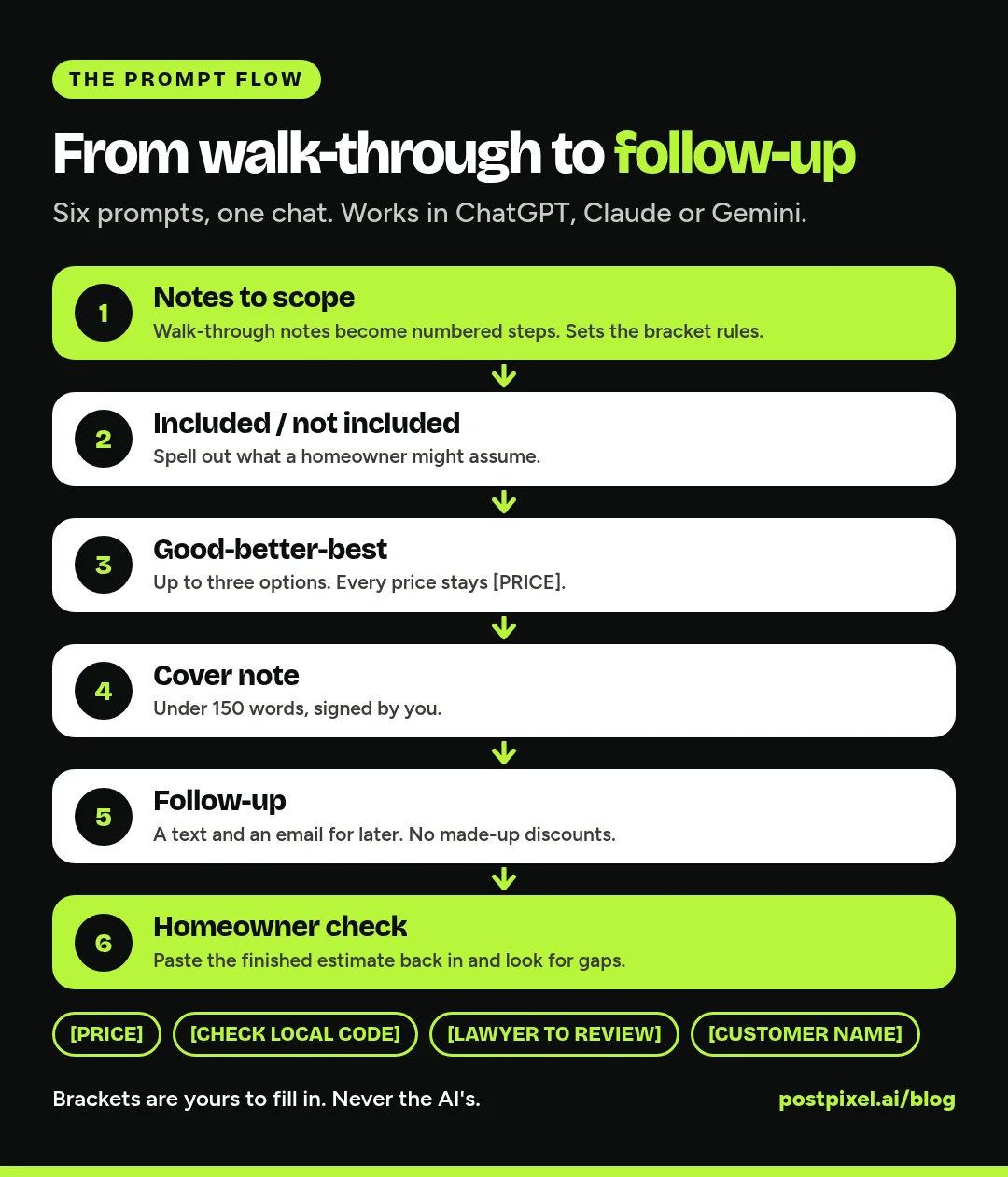
Run these in one chat so the AI keeps the context from step to step. Copy a prompt, replace the [BRACKETED] parts that are yours to fill, and paste it in. If the AI gets something wrong, tell it plainly (“we don’t haul away the old unit, take that out”).
Prompt 1: Set the rules and turn your notes into a scope
This first prompt does two jobs. It sets the guardrails for the whole chat, and it turns your walk-through notes into a clean scope of work.
I own a [TRADE, e.g. HVAC / plumbing / roofing / painting / remodeling] company in [STATE].
I'm writing an estimate for a [JOB TYPE, e.g. water heater replacement / bathroom repaint / roof repair].

Rules for this whole conversation:
- Never write a price, cost, quantity, discount, deposit, markup or hourly rate. Leave every number as a [BRACKETED PLACEHOLDER] for me to fill in.
- Never state code, permit or inspection requirements as fact. Mark them [CHECK LOCAL CODE].
- Never write payment, warranty, change or cancellation terms as final. Mark them [LAWYER TO REVIEW].
- Use the customer placeholder [CUSTOMER NAME] and [JOB ADDRESS]. Don't ask me for real customer details.
- Write in plain, friendly language a homeowner understands. No jargon without a short explanation.

Here are my walk-through notes:
[PASTE YOUR NOTES, e.g. "50 gal gas WH, leaking at base, 12 yrs old, tight closet, needs new venting?, cust wants it done this week"]

Turn these into a scope of work: a one-sentence summary of the job, then numbered steps in the order we'd do them. If something in my notes is unclear, ask me before guessing.
Messy notes are fine. Voice-to-text notes from the truck are fine too. The point is to get your knowledge out of your head and into clean sentences.
Prompt 2: Inclusions and exclusions
Most estimate disputes start with “I thought that was included.” This prompt spells it out.
Using the scope we just wrote, draft two lists:
1. "What's included": every task, material and service in this job, in plain words. Quantities stay as [QTY].
2. "What's not included": things a homeowner might reasonably assume are part of the job but aren't, based on what I told you. Examples to consider: [e.g. drywall repair, painting, haul-away, permit fees, hidden damage found after work starts].
If you think something should be on either list that I didn't mention, put it under "Ask the owner" instead of adding it.
Mark anything about hidden conditions or extra charges as [LAWYER TO REVIEW].
The “Ask the owner” line keeps the AI from quietly promising something your crew doesn’t do. Read the exclusions out loud. If you’d be embarrassed explaining one to a customer, reword it.
Prompt 3: Good-better-best options
Giving customers a few clear choices is common in the trades. The AI is good at laying them out; it should never price them.
Turn this job into three options: [OPTION 1 NAME, e.g. Repair], [OPTION 2 NAME, e.g. Replace standard] and [OPTION 3 NAME, e.g. Replace high-efficiency].
For each option, list:
- What's included (from our scope)
- What's different from the option below it
- Who it's best for, in one sentence
- Warranty: [WARRANTY TERMS, LAWYER TO REVIEW]
- Price: [PRICE]
Show it as a simple table, then as three short paragraphs I can paste into my estimate. Don't recommend an option, and don't use pressure words like "only" or "limited time".
A tip: only offer options you’d be happy to do. If you only do one version of a job, ask for a single option plus a short list of add-ons, each with an [ADD-ON PRICE] bracket.
Prompt 4: The estimate cover note
The estimate shows the work. The cover note shows the person behind it.
Write a short cover note (under 150 words) to go with this estimate. Include:
- A thank-you for having us out on [DATE OF VISIT]
- A two-sentence recap of what we found, in plain words
- What the options are, without prices
- How long the estimate is valid: [VALID FOR]
- How to accept or ask questions: [HOW TO REACH US]
Sign it from [YOUR NAME], [COMPANY NAME]. Friendly, direct, no hype, no exclamation marks.
Prompt 5: The follow-up message
A lot of estimates go quiet because nobody followed up. Write the follow-ups once and reuse them.
Write two short follow-up messages for this estimate:
1. A text for [NUMBER] days after sending (under 300 characters)
2. An email for [NUMBER] days after sending (under 120 words)
Both should: remind them what the job was, offer to answer questions, and make it easy to say yes or no. No discounts, no deadlines and no pressure unless I add them: [ANY OFFER, OR "NONE"].
Keep the offer line as “NONE” unless you’ve actually decided on one. The AI will otherwise suggest a discount you never planned to give.
Prompt 6: Check it like a homeowner would
Once you’ve filled in your prices and your lawyer-approved terms, paste the finished estimate back in, with [CUSTOMER NAME] and [JOB ADDRESS] still as placeholders, and run:
Act as a careful homeowner reading this estimate before signing. List:
- Anything unclear or easy to misread
- Places where the scope, inclusions and exclusions seem to conflict
- Questions you'd ask before saying yes
Don't change any prices or legal terms. Just point out problems so I can fix them.
Tweaks by trade
Add a line of trade context to Prompt 1 and the drafts get much better.
HVAC
Name the equipment type and the job (repair, changeout, new install). Ask the AI to list ductwork, electrical and thermostat changes as separate items so each can carry its own [PRICE]. Keep refrigerant work, permits and any efficiency or rebate claims marked [CHECK LOCAL CODE] or [VERIFY].
Plumbing
Tell it what’s being replaced and how access looks (closet, crawlspace, slab). Ask for wall and floor patching to be its own line in exclusions or add-ons. Water heater venting, gas work and backflow items stay [CHECK LOCAL CODE].
Roofing
Give it the roof type, layers to remove and anything you saw in the attic. Ask it to put decking replacement as a per-unit bracket ([PRICE PER SHEET]) and to add a plain-English note about hidden damage that you’ll confirm in writing before doing extra work [LAWYER TO REVIEW].
Painting and remodeling
List rooms and surfaces. Ask it to separate prep (patching, sanding, caulking) from painting so the customer sees the work that goes in. For homes built before 1978, keep a [CHECK LEAD-SAFE REQUIREMENTS] line in the scope.
Estimates, contracts and the law
This is where the “lawyer licensed in your state” advice matters most.
- A signed estimate is often the contract. If your estimate has a signature line, a deposit or payment terms, it’s doing a contract’s job. Have your lawyer write those parts once, and paste them into your template word for word. Don’t let the AI paraphrase them.
- Selling at the customer’s home can trigger a cancellation right. The FTC’s Cooling-Off Rule covers many sales made at the buyer’s home of $25 or more and requires certain cancellation notices, with some exceptions (16 CFR 429.0 and 429.1). Many states add their own home improvement contract rules on top. Ask your lawyer which apply to you.
- Change orders need their own paper. When the job changes, write it down and get it signed before the extra work starts. Our service and maintenance agreement prompts use the same bracket method for longer documents.
Putting your estimate template to work
- Load it into your software. Most estimating and field service tools let you save templates with line items and terms. If you’re still choosing one, our Housecall Pro vs Jobber comparison covers how each handles quotes and estimates.
- Build a scope library. Save the scope, inclusions and exclusions for your five most common jobs. Next time, you only adjust them.
- Keep your price book separate. Your prices live in your software or spreadsheet, not in a chat history.
- Review it every year. Costs and rules change. Rerun Prompt 6 after any big edit.
Mistakes to avoid
- Copying a number the AI wrote. If you didn’t type it, delete it and put the bracket back.
- Pasting real customer details. Templates only. Names, addresses, phone numbers and payment details stay in your own software.
- Letting the AI rewrite your legal terms. Paste your lawyer’s wording in as-is.
- Promising what your crew doesn’t do. Every line in “What’s included” is a promise.
- Making it too long. If a homeowner can’t understand it in two minutes at the kitchen table, cut it down.
FAQ
Can ChatGPT price a job for me?
No, and you shouldn’t ask it to. It doesn’t know your labor costs, material costs, overhead or local market, so any number it gives is a guess that sounds confident. Use it for the wording and structure, and set every price yourself.
Is it safe to put customer information into ChatGPT?
Keep it out. Use placeholders like [CUSTOMER NAME] and [JOB ADDRESS] in the chat, and fill in the real details inside your own estimating or field service software. Never paste payment details into any AI chat.
Is an estimate a legally binding contract?
It can be, especially once it’s signed or a deposit is paid. The rules vary by state, so have a lawyer licensed in your state review your estimate template and any terms on it before you use it.
Do these prompts work in Claude or Gemini?
Yes. They’re plain language and don’t depend on any one tool. Run them in a single conversation so the AI keeps the context from your notes.
What should a contractor estimate include?
Usually: your business details, the customer and job placeholders, a scope of work, what’s included and not included, options if you offer them, prices, how long the estimate is valid, payment terms, warranty and how to accept. Payment, warranty and acceptance terms should come from your lawyer.
One more thing
Once the estimate turns into a finished job, PostPixel makes it easy to share the work in a branded post without the design work. Try PostPixel for free.